

Accounting for Unearned Income
The Unearned Income account in iMIS is designated to account for unearned revenue.
Explaining the Unearned Income account
Unearned income, sometimes referred to as deferred revenue or unearned revenue, is a liability that is created when monies are received by a company for goods and services not yet provided. The unearned amount is recorded in a liability account, such as the Unearned Income account. After the amount has been earned, the Unearned Income account is reduced, and a revenue account is increased.
ExampleA company informs a customer that a $5,000 deposit is required before it will begin work on the customer's special order. The customer gives the company $5,000 on December 28 and the company will begin work on the special order on January 3. On December 28 the company will debit Cash for $5,000 and will credit a liability account, such as Customer Deposits (or Unearned Revenues or Deferred Revenues) for $5,000. No revenue is reported in December for this special order since the company did not perform any work. When the special order is completed in January the company will debit the liability account for $5,000 and will credit a revenue account.
Deferred Income is the most common example of this type of liability in which the offset to cash is a credit to such a liability, and the liability amount is typically gradually transferred to income on an amortized basis as the income is earned (such as 1/12th of a membership fee being transferred from deferred income to income with each month of the membership year).
There is not yet support for maintaining a “Deferred Income” balance and managing the amortized recognition of income; however, iMIS does properly track the liability associated with a payment that is not applied or not fully applied to an invoice. The default Unearned Income liability account is used any time that a payment is in place and that payment is not fully applied to one or more invoices. If the payment is not fully applied to invoices, it is in a state of being at least partially unearned.
In summary:
At any given time, the net impact of the GL journal transactions to record payments and income/miscellaneous charges is to debit cash and credit income and/or miscellaneous charges if income and/or miscellaneous charges are associated with a payment and said income and/or miscellaneous charges have been posted. Whenever there is a scenario in which a payment is not fully applied to one or more invoices, the excess between the amount of the payment and the portion of the payment that is applied to one or more invoices is represented as an Unearned Income liability.
Scenarios in which the Unearned Income account is used
The following transaction scenarios use the Unearned Income account in a GL journal entry.
Scenario 1: Temporary offset when accounting for submitted cart transactions and the cart transactions are processed on an accrual basis
📘 Note
This transaction scenario is similar to a clearing account scenario.
This transaction scenario plays out when a payment that is submitted with the cart is posted before the sales transaction connected to the cart order line(s) is posted. In this situation, the Unearned Income account is used as both the offset (credit) to cash and as the offset (debit) to income when the journal entries to record cash and to record income are generated.
The credit and debit to unearned income, which happen almost instantaneously, cancel (or wash) each other out, leaving no impact on the Unearned Income account balance. As long as the transactions are posted back-to-back, which should always be the case, there is no residual balance left in the Unearned Income account.
If this were the only time that the Unearned Income account was used in the creation of a journal entry, then it would be sufficient to simply supply a Clearing Account for the default Unearned Income account as it should never carry a balance.
Scenario 2: Offset to income when credit adjustments are applied to original invoices in which the original invoices have been paid
📘 Note
This is the primary scenario when a residual balance is retained in Unearned Income.
When a paid invoice is reversed (and the income is debited), then the payment becomes fully or partially unapplied and the unapplied portion of the payment (open credit) is represented as an unearned income liability.
In other words, this invoice reversal creates a residual credit balance in the Unearned Income account. The unearned income balance will remain until the payment is either subsequently applied to another transaction/invoice or is refunded or recorded as refunded.
Scenario 3: To record a prepayment or overpayment
Perhaps a payment was received that was either greater than the items to be purchased or for which it is unclear what the payment should be applied to. These payments can still be recorded in iMIS as an overpayment or a prepayment, depending upon the scenario. The amount of the payment left unapplied, once the cart is submitted, is tracked as an unapplied or open credit amount.
Scenario 4: Unearned income balance is cleared when unapplied payment balance is either refunded or applied to a new transaction or invoice
Unearned Income Liability amounts stemming from credit adjustments (scenario #2) are subsequently reversed when the unapplied payment balances that correlate to the liability amounts are resolved through one of the following:
- The issuing (or recording) of a refund, or
- The re-application of the amount to a subsequent transaction (i.e., application of open credit)
Issuing and/or recording of a refund
When all or a portion of a payment is unapplied, one option available to the staff user is to issue and/or record a refund of the unapplied amount. When a refund is recorded, then the unearned income (unapplied) balance associated with that payment is reversed (debited).
The offset to Unearned Income depends upon the payment type of the payment being refunded:
- If the original payment was made by credit card, then the expectation is that the refund will be processed by one of the following:
- Credit card was processed through the iMIS Pay gateway: Processing the refund directly through iMIS
- Credit card was processed through any other gateway: Recording the transaction as refunded in iMIS
- If the original payment was made by check, then the expectation is that the refund is also made by check. The refund check may be issued through a third-party Accounts Payable (AP) package or simply by writing a manual refund check. Once the refund check is issued, it should be recorded in a similar manner to that outlined for a recorded credit card refund. If the refund was issued via check, then iMIS will offset the Unearned Income entry (debit) with an entry to the Refund Clearing Account (credit) instead of directly to the Cash Account. This is because the AP system will credit the cash account when the refund check is issued. Since the AP Package will credit the cash account, you should use the refund clearing account when recording the payable/payment through the AP package (or when recording the manual check). The entries to Refund Clearing in accounts payable and in iMIS will offset each other, yielding a net effect of zero.
Applying an Open Credit
When all or a portion of a payment is unapplied, a second option – which could be available to either the staff or self-service user – is to apply the unapplied amount (or open credit) to a subsequent transaction.
In this scenario, the Unearned Income balance is reversed (debited) and the Income is increased (credited), or in the case of the open credit being applied to an existing accrual invoice balance, the accounts receivable decreased (credited).
Example scenarios
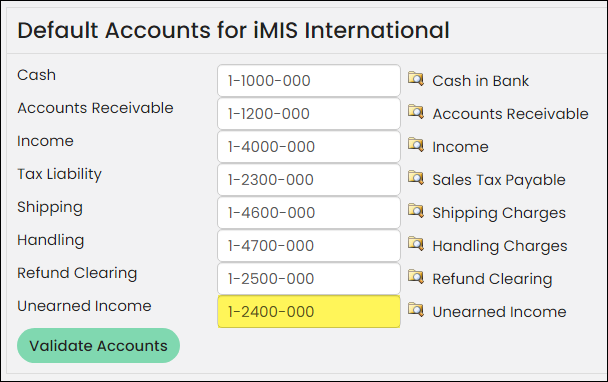
These example scenarios have been processed within a standard iMIS demonstration database. The default Unearned Income account, which resides in the liability section of the General Ledger, is highlighted in the following image.
Unearned income account in the role of a clearing account
When a payment is submitted with a cart transaction, iMIS tracks the payment separate from the invoice/sales transaction, and as such, posts the two components of the cart separately. In the case of an accrual transaction, the entry to cash and the entry to income are generated in separate journal entries. Depending upon whether the payment of the sales transaction (or invoice) posts first, the offset to both cash and to income is either:
- Unearned Income (if the payment posts first), or
- Accounts Receivable (if the sales transaction posts first)
In either case, the entries to Unearned Income or Accounts Receivable offset or net to zero, so these accounts simply are acting in the mode of clearing accounts in this case.
The following example details the entries that are generated when the payment happens to post before the sales transaction. This sample transaction shows an event registration with an add-on program item, paid by check.
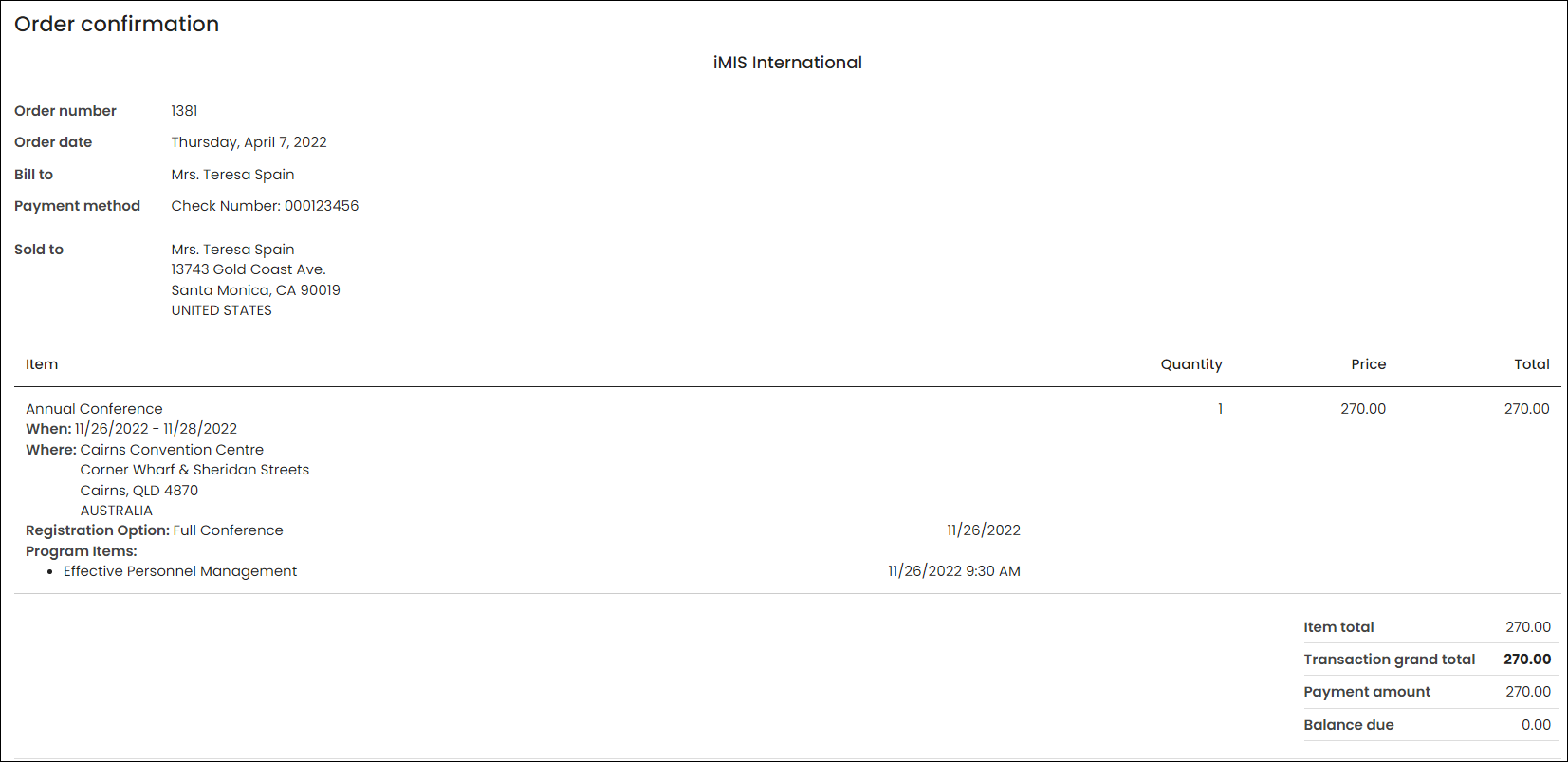
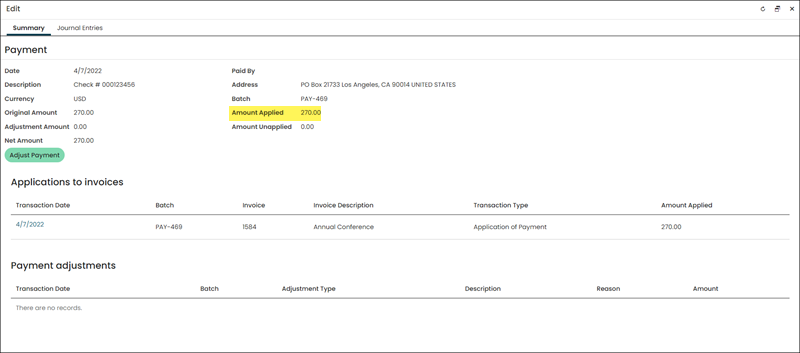
Locate the payment through Finance > Pay Central > Find payments. You can see that the full payment is applied to the invoice that was generated when the cart sales transaction was posted.
Click the Journal Entries tab. The journal entry that recorded the payment debits Cash for the full amount and with a full offset credit to Unearned Income. To see the related sales journal entry, select the date link under Related sales journal entries.
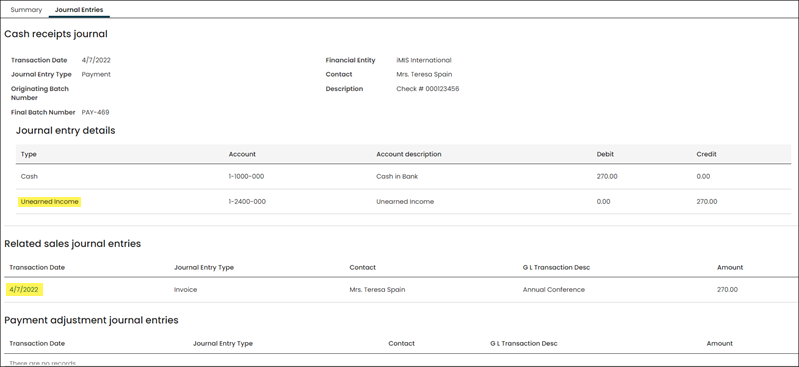
A full offset to Income in this case is a debit to Unearned Income. The credit and debit entries to Unearned Income net or wash to zero. Since the entries are generated in a nearly instantaneous timeframe, there is really no impact to Unearned Income. In this particular scenario, the account serves as a clearing account.
Unearned income balance tied to credit adjustments
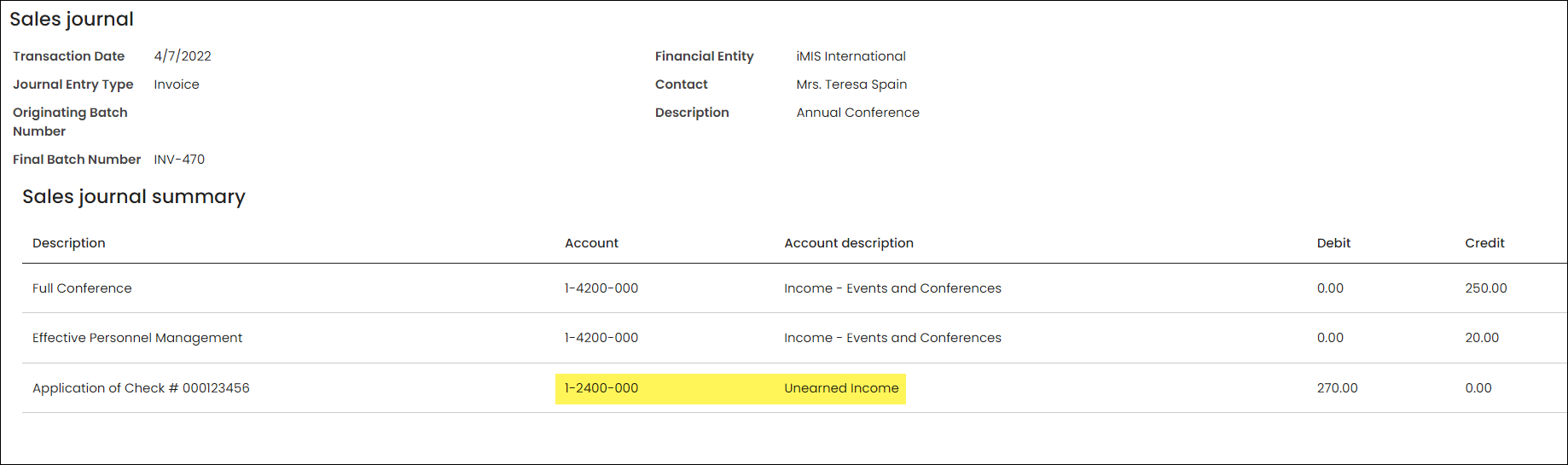
When a cancellation or a credit adjustment is applied to a paid sales transaction or invoice, then the portion of the payment was applied to the invoice amount that is now reversed becomes unapplied and is represented as an Unearned Income liability when the adjusting journal entry is recorded.
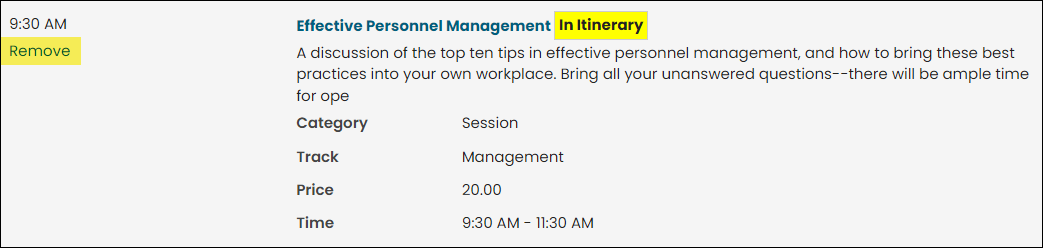
Following along from the example of the paid in full event registration from the last section, this scenario illustrates the cancellation of just the program item from that original event registration. From the event showcase with the event registration displayed, the Effective Personnel Management program item was removed.
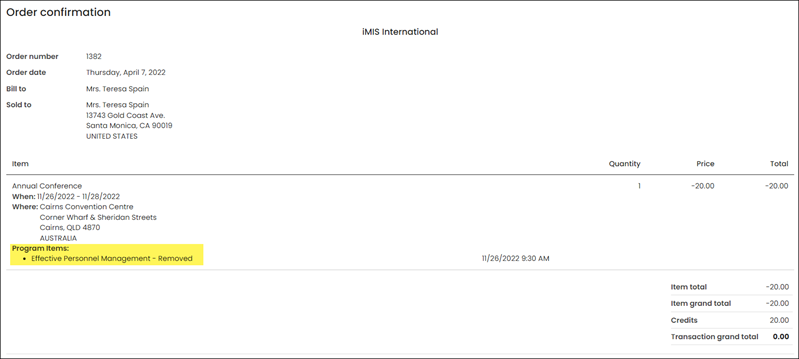
After the change was processed through the cart, the confirmation is sent.
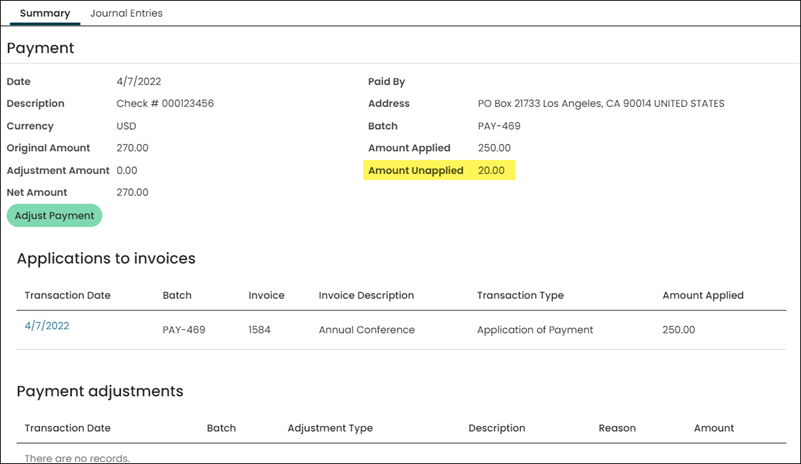
With the program item’s registration being cancelled, this created a separate credit adjustment invoice which was applied to the program item’s invoice balance. This in turn evoked a reversal of the payment application to that line item. A lookup of the payment shows that only 250.00 of the 270.00 amount is now applied to the original invoice (representing the unadjusted registration option). The remaining 20.00 is unapplied and therefore represents a liability in the current state.
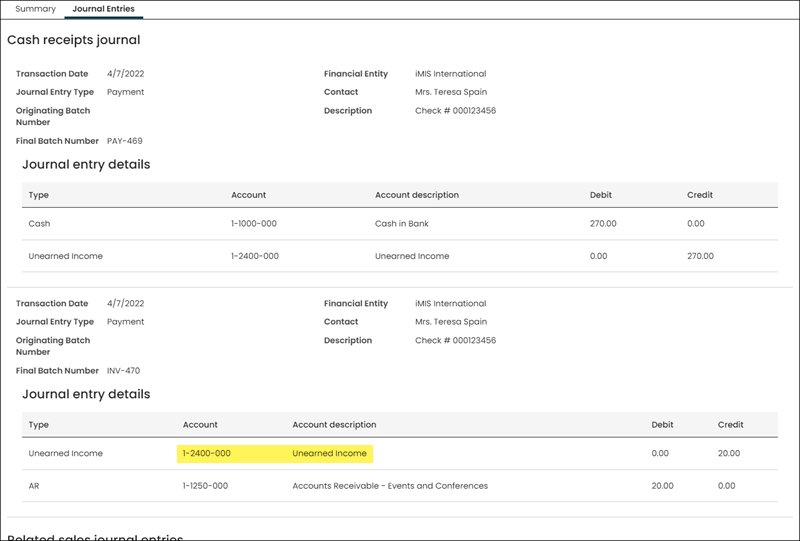
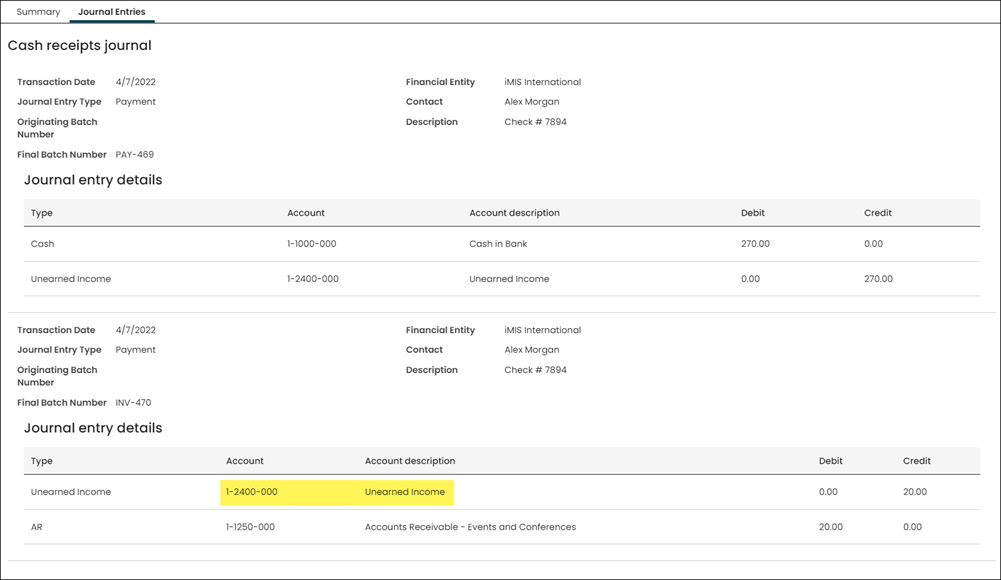
Reviewing the journal entries associated with the payment, a new journal entry shows the entry (credit) to record the Unearned Income liability with the offset to Accounts Receivable.
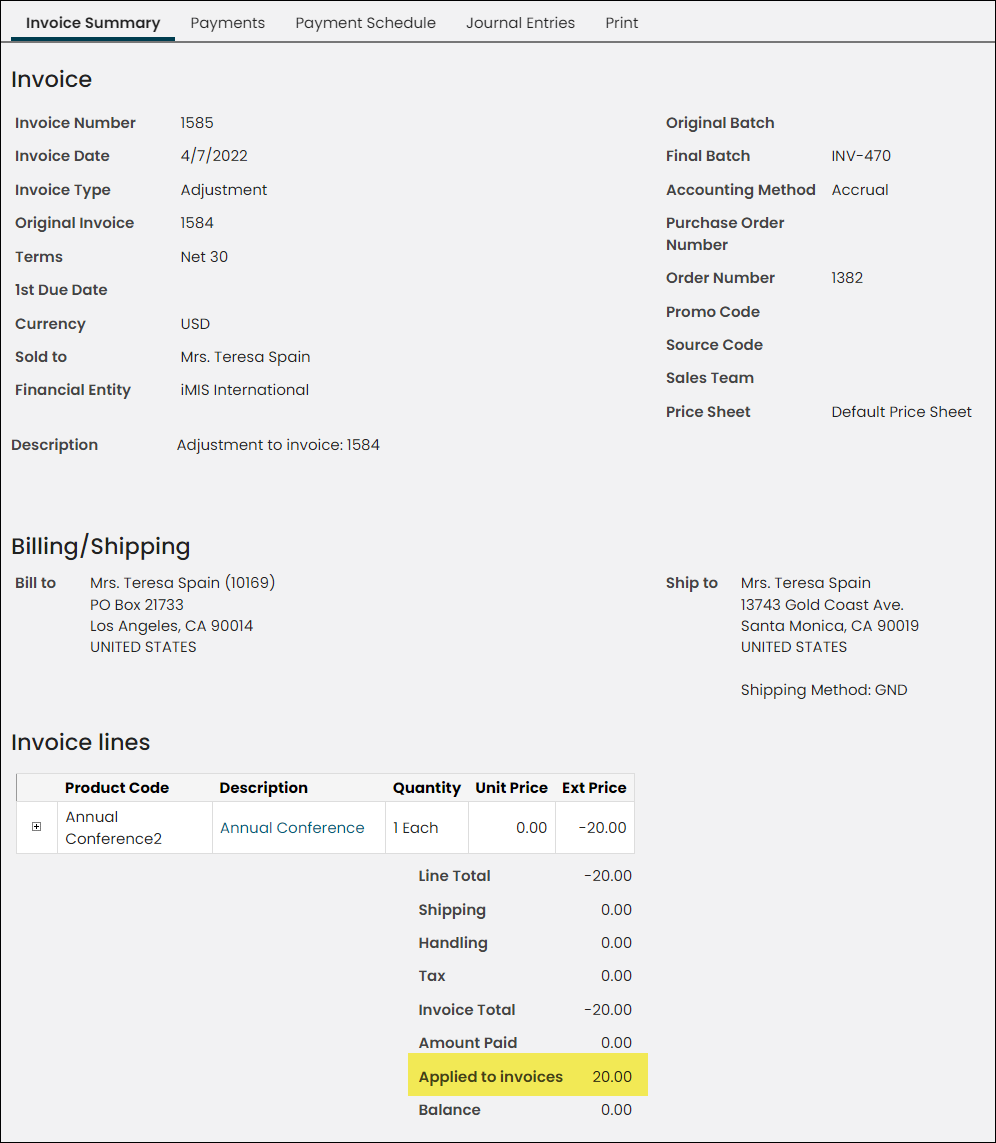
A review of the newly created adjustment invoice shows that it is now applied to the invoice for the full amount, in place of the payment.
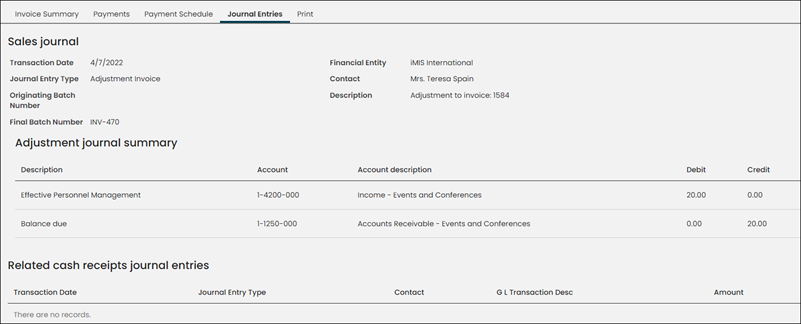
The adjusting journal entry associated with the credit adjustment invoice reduces income and clears the entry to Accounts Receivable.
Unearned income balance cleared upon recording a refund
The Unearned Income liability stemming from a credit adjustment to a prepaid invoice will remain intact until the unapplied amount is either refunded or applied to a subsequent sales transaction/invoice.
The transaction below illustrates such a scenario. The assumption is that, since the original payment was made by check that the refund was processed in kind by issuing a refund check to the customer. The refund check would have been processed outside of iMIS, most likely through a third party Accounts Payable package or via a manually written refund check.
In the case of recording a refund check, iMIS will reverse the Unearned Income balance (debit) and offset with an entry to Refund Clearing. This is necessary as the Accounts Payable package will record the entry to cash. It is important to use the same Refund Clearing account when recording the payable (or the payment) through the Accounts Payable (or General Ledger) package. That way the entries to Refund Clearing, the one generated by iMIS and the one used to record the payable or payment issued, will offset and net to zero.
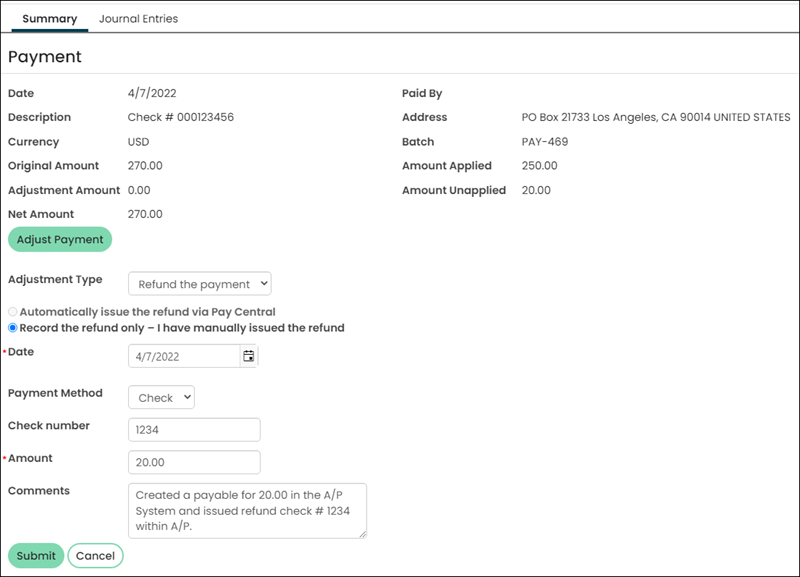
Once the refund is recorded, the payment inquiry window will show the refund transaction.

There will be a link to the payment adjustment journal entry on the Journal Entries tab.

Clicking on the link shows the entry to reverse (debit) the Unearned Income liability with the offset to the Refund Clearing account.
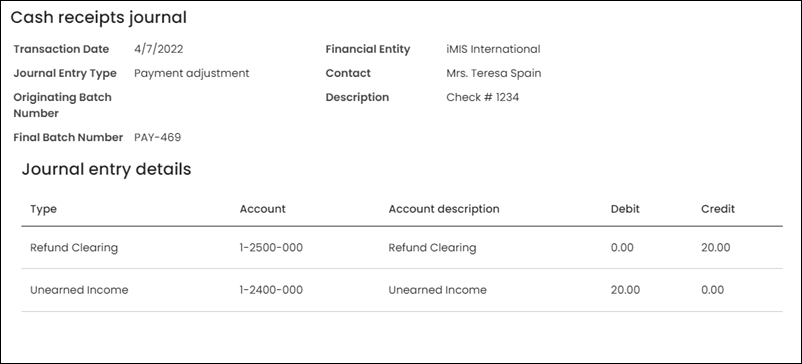
Unearned income balance cleared when open credit applied to subsequent transaction
This sample transaction shows an event registration with an add-on program item, paid by check. The program item was then removed, resulting in a credit of 20.00. This yielded an unapplied (Unearned Income) balance of 20.00.
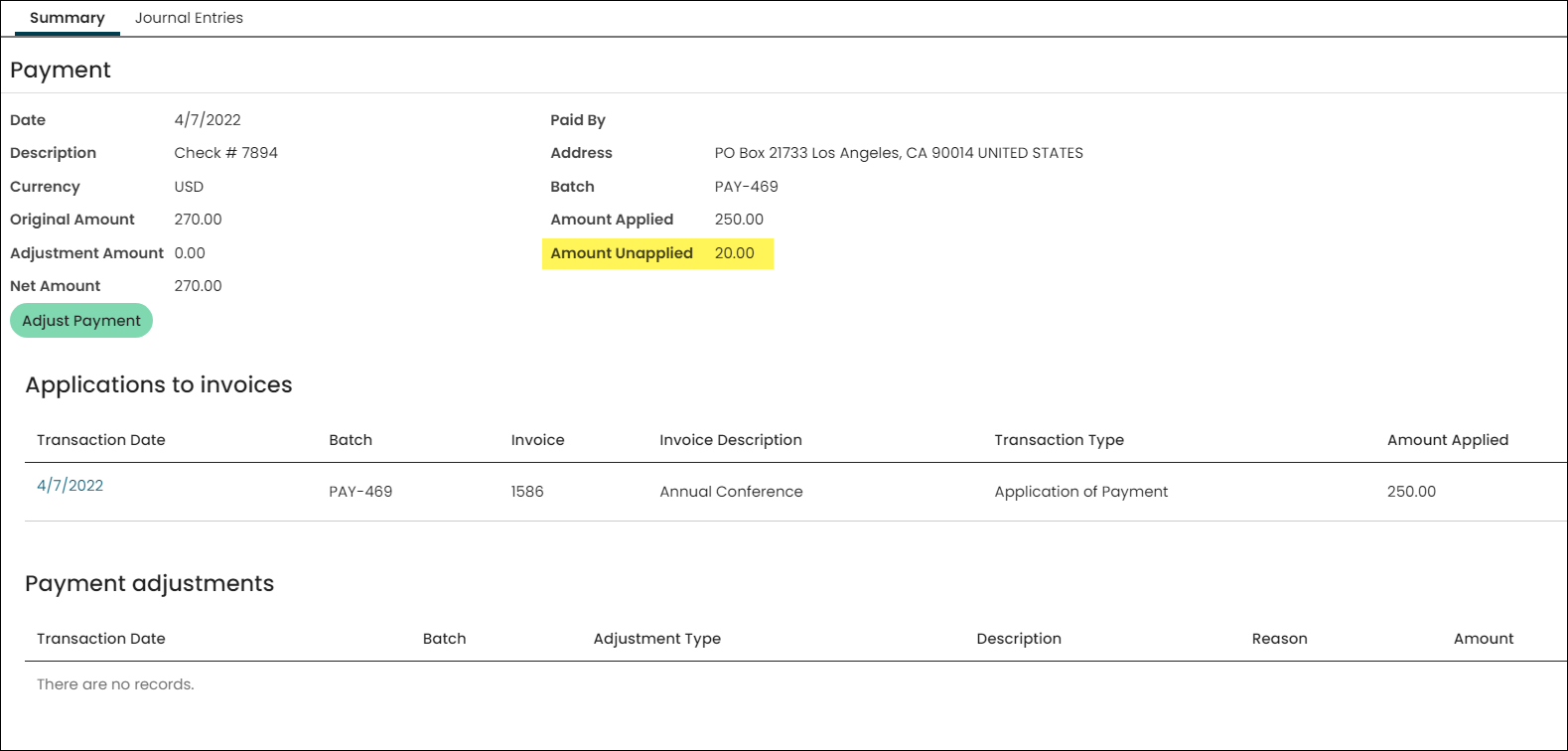
A 20.00 liability balance is carried in the Unearned Income account.
A new sales transaction is processed for the same customer. The product amount is set to 20.00 and no miscellaneous charges are incurred, so that the cart sales transaction exactly equals the amount of the unapplied payment (i.e., the open credit amount).

Since the open credit payment method is in the Staff payment method set, and because the customer has one or more payments with an unapplied balance, the Available credit amount is displayed along with the option to apply it in lieu of or in addition to a new traditional payment. The Apply button is clicked.
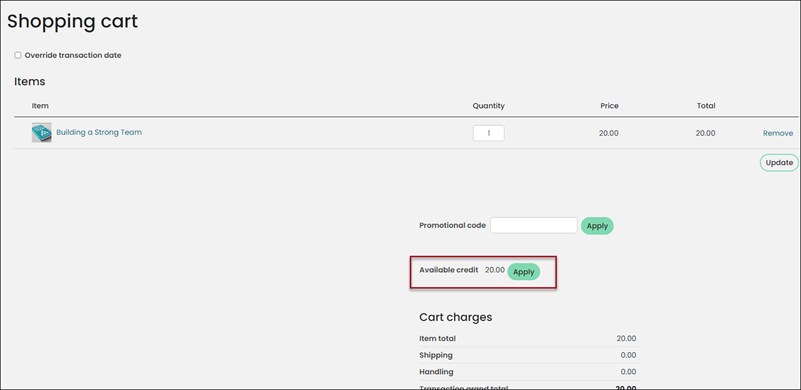
Since the amount of the applied credit matches the cart balance, when the cart is redisplayed, no other payment options appear. The Submit Order button is clicked to finalize the transaction.
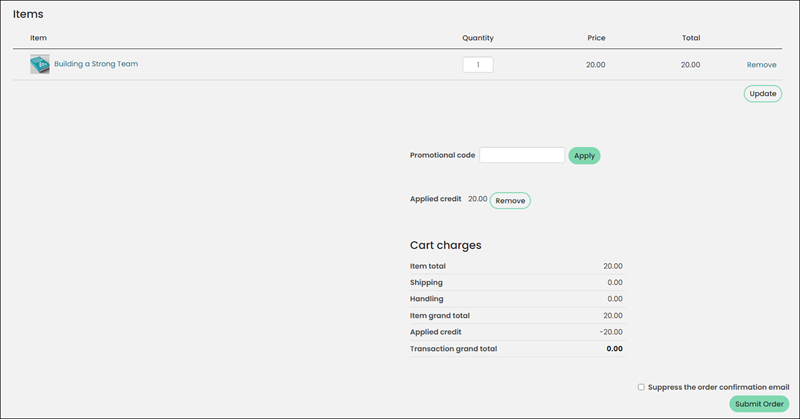
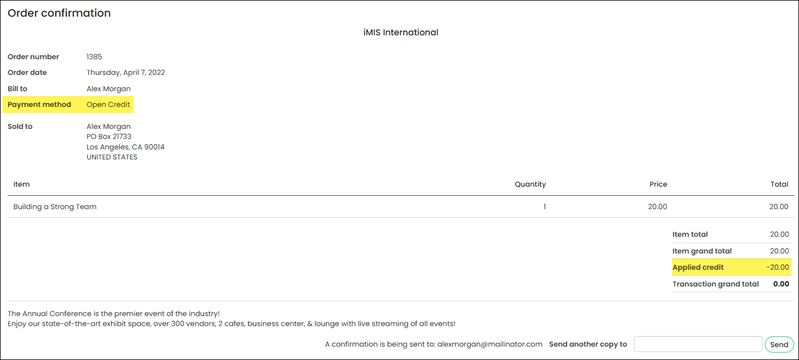
The resulting order confirmation reflects that the open credit has been applied.
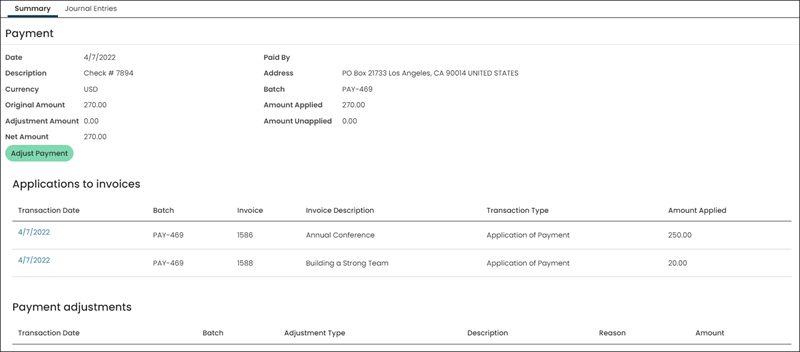
A review of the payment shows that the payment is fully applied, to two separate invoices/sales transactions in this case.
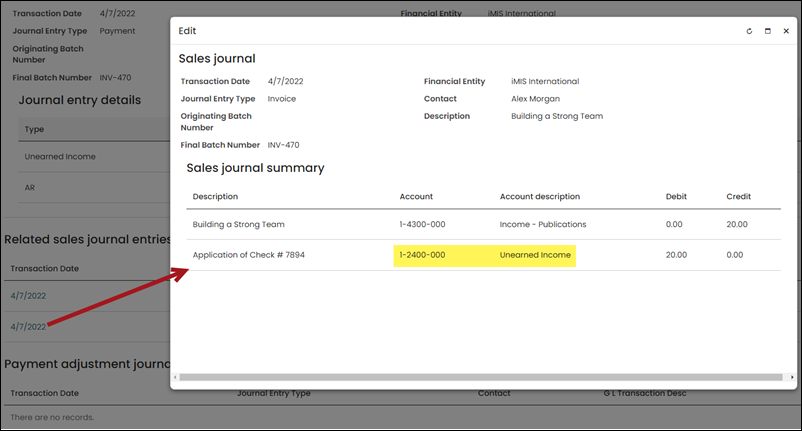
On the Journal Entries tab, the journal entry of interest relative to the application of open credit is the one associated with the new sales transaction for 20.00.

Clicking the date link for the sales journal entry shows that the Unearned Income balance is reversed (debited) as an offset to income.
Prepayments and over payments
The other scenarios that could lead to an unapplied balance for a payment, other than the evoked reversal of a payment application associated with a invoice reversal/credit adjustment, are an initial prepayment or overpayment.
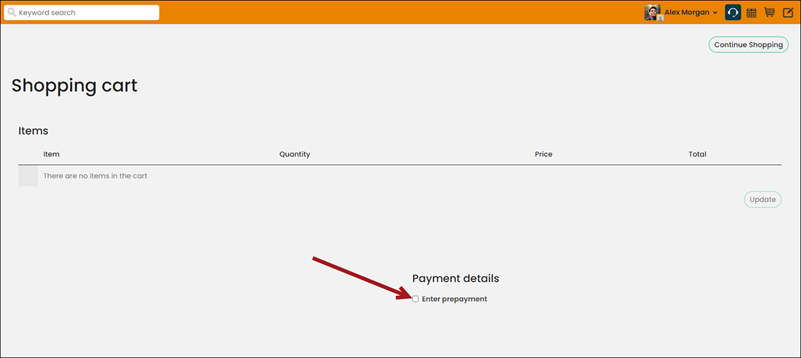
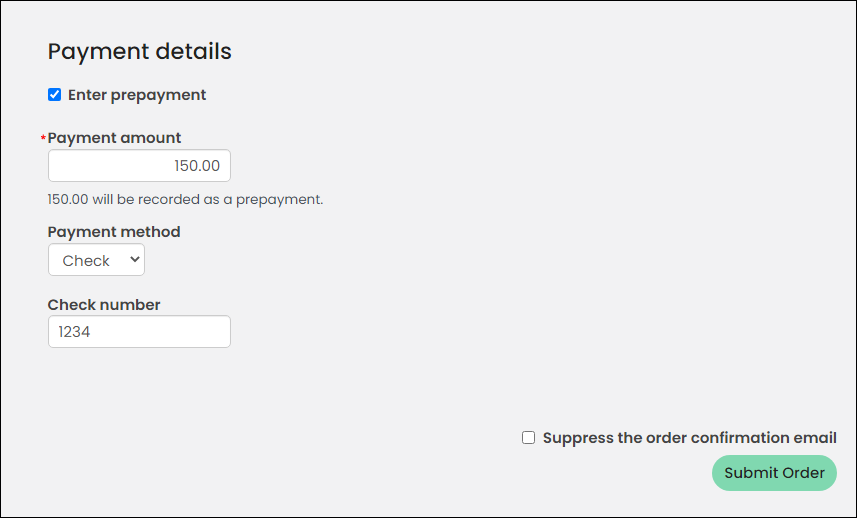
The amount of the initially recorded payment that is not associated with an order/invoice balance will immediately be recorded as Unearned Income. Below is an example of a prepayment in which the payment is not applied to anything. The cart is empty.
To process a prepayment on behalf of a contact, do the following:
- Go on behalf of the contact.
- Click the shopping cart icon to bring up an empty cart.
- Enable Enter prepayment under Payment details.
- Supply payment information and click Submit Order.
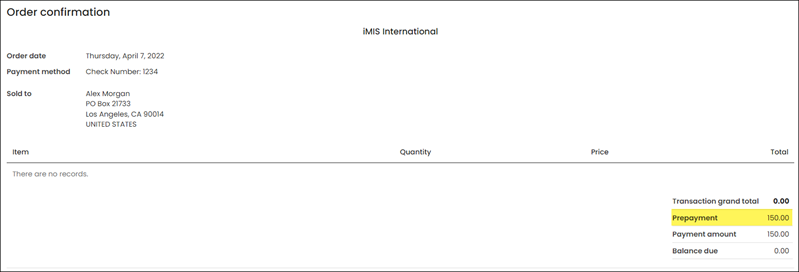
- The confirmation shows that the payment was processed as a Prepayment.
Tracking and Reconciling the Unearned Income Account Balance
It is always a good idea to keep track of the unapplied amounts in payments that represent the open credit balances. These unapplied payment amounts can be accessed in one of two ways:
- Using the Payments with Credit Balance query to access payments – The payments that have outstanding unapplied amounts can be retrieved by
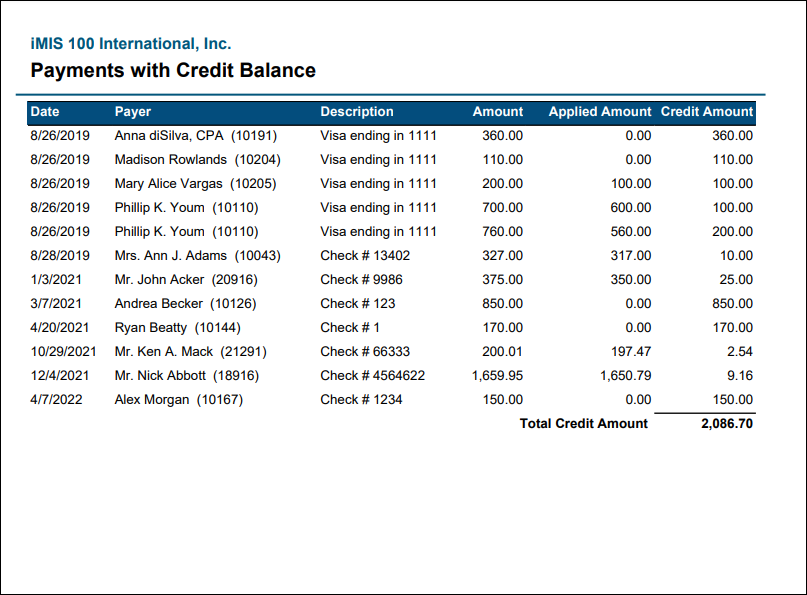
- Reviewing the Payments with Credit Balance report - These amounts can collectively been seen by running the Payments with Credit Balance report under Reports > Accounting reports.
Best Practices for Controlling Unearned Income Amounts
The following is a list of best practices when it comes to using the report and query and maintaining control over Unearned Income and/or Open Credit balances:
- Reconcile the Unearned Income account balance – If you regularly use the General Ledger Export to import iMIS transactions into your General Ledger, then the Payments with Credit Balance report’s grand total should match the current General Ledger Unearned Income account balance.
- Become aware of any amounts that should be eligible for refund – It is always a good idea to know which payment amounts are unapplied, and depending upon policy, are eligible for refund. As seen in the section immediately below, you should be able to explore all such payments, and the details about each, by making use of the Payments with Credit Balance query.
- Record any manually issued refund as soon as possible after the refund is issued – This practice is especially critical if you allow the option of open credit balances being applied to new cart transactions in lieu of a new payment. If the refunds are not recorded in a timely fashion, there is a risk that a user will use an open credit balance when a refund has been issued, for not recorded, for that amount.
Using the Payments with Credit Balance query and report
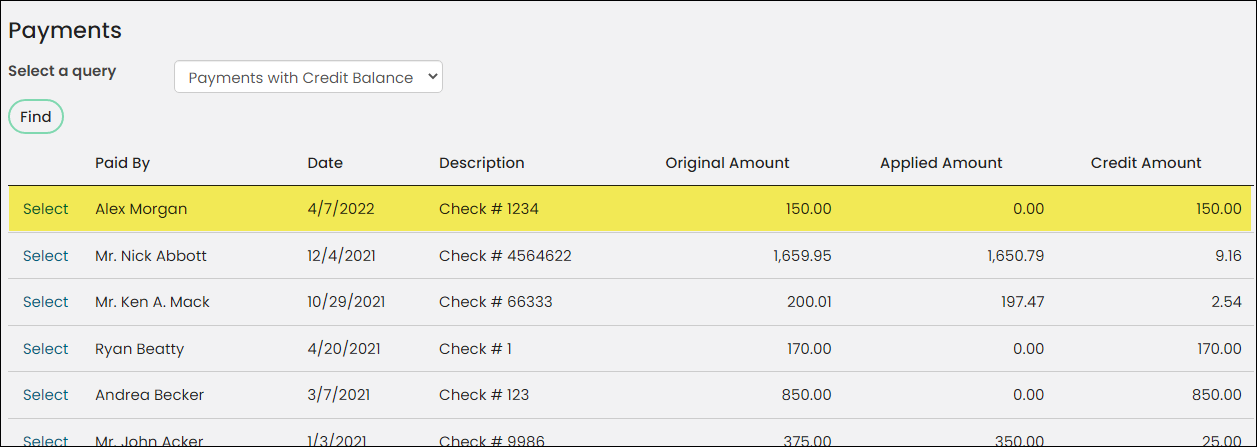
When you use the Payments with Credit Balance query (Finance > Pay Central > Find payments) to view all the payments that have an unapplied balance, you can readily review each payment on that list, and if appropriate, you could initial refund processing.
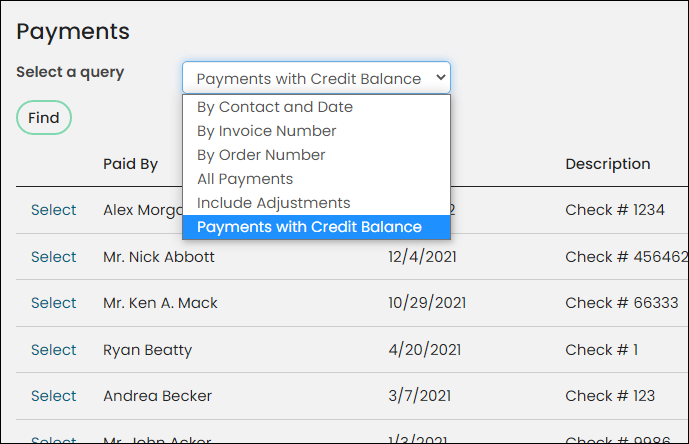
To access the payments with unapplied amounts:
- Go to Finance > Pay Central > Find payments.
- From the Select a query drop-down, select Payments with Credit Balance.
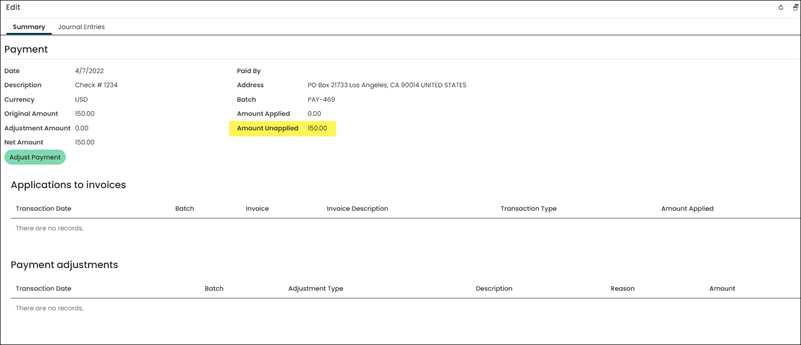
- When the list is displayed, you can select any payment to view the details. In this example, I am selecting the Prepayment that was just processed in the last section.
- Since it was not applied to any product or invoice, it is fully unapplied.
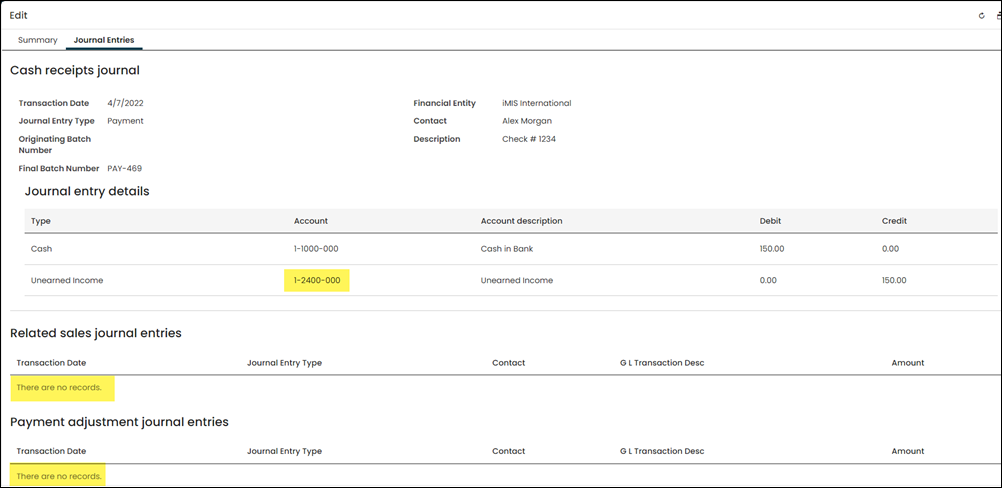
- Click on the Journal Entries tab. Notice there is a credit entry to Unearned Income as the offset to the debit entry to the Cash Account. Since there are no related sales journal entries nor a payment adjustment entry, the unapplied amount is indeed represented as a credit balance in the Unearned Income liability account.
When you run the Payments with Credit Balance report to view all the payments that have an unapplied balance, you can see the grand total of all unapplied amount balances in addition to the list of payments with an unapplied amount.
To run the report:
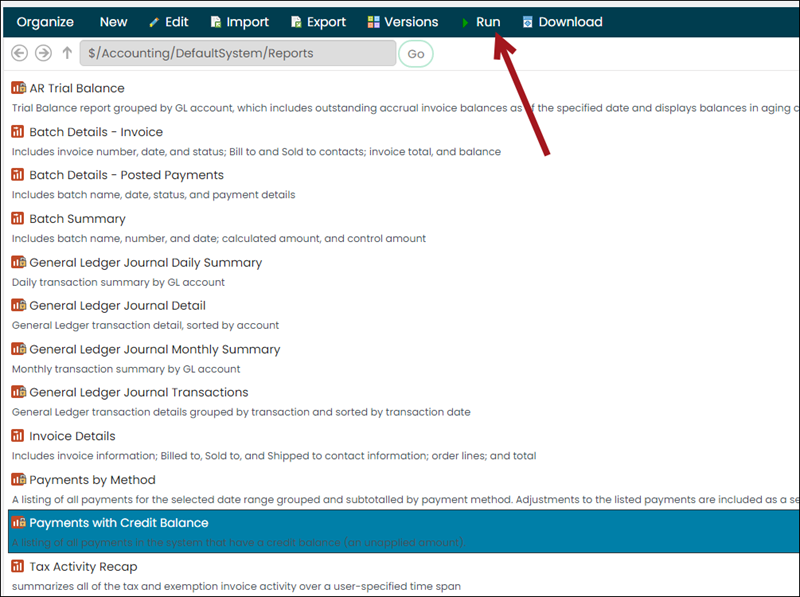
- Go to Reports > Accounting reports.
- Select the Payments with Credit Balance report.
- Click Run.
- In similar fashion to the query, the report will list all payments, along with the grand total Credit Amount. If all iMIS transactions have been exported and imported into the General Ledger, this grand total should match the current balance in the General Ledger’s Unearned Income liability account.
Updated 5 months ago