

Restricting or granting REST API access to panel sources
To help protect sensitive data and prevent unintended external access, you can control which panel sources are available through the REST API. This is done from the Panel Source Security page, where you can configure access on a per–panel source basis.
Updating a panel source’s REST API availability
Do the following to update a panel source’s REST API availability:
- Go to RiSE > Panel Source Security.
- From the Select Panel Source drop-down, choose the panel source.
Note
Security cannot be changed for system panel sources, since these panel sources use locked business objects and have fixed security settings. A message will indicate when a panel source cannot be edited.
-
Enable or disable the Available via the REST API option. By default, panel sources are not available to the REST API unless this option is enabled.
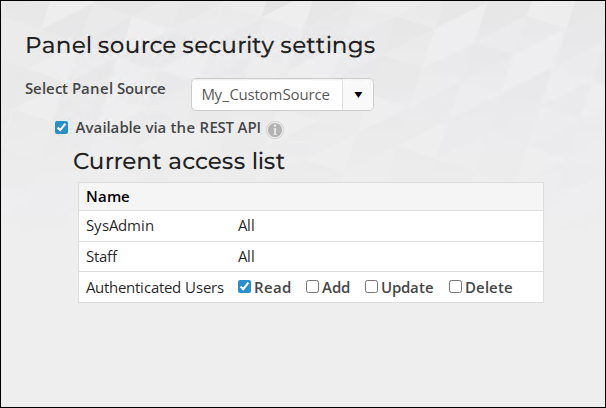
- The Current access list defines which user roles can interact with the selected panel source and what actions they can perform:
- SysAdmin and Staff will always have full access when this option is enabled.
- AuthenticatedUsers can be granted Read, Add, Update, or Delete permissions. Update these settings as necessary for the selected panel source.
- Click Save.
Best practices
Restricting REST API access to panel sources helps prevent unauthorized users from accessing or modifying sensitive data. By explicitly defining which panel sources are exposed and what actions are allowed, you maintain better control over your system’s security while still supporting necessary integrations.
Review the following best practices:
- Only enable Available via the REST API for panel sources that require external access.
- Limit permissions to only what is necessary (for example, Read-only access when possible).
- Regularly review panel source access to ensure it aligns with your organization’s security requirements.
Updated 5 months ago