

Adding a query source to the default list
This article covers how to add additional sources to the default list of sources located in any query definition.
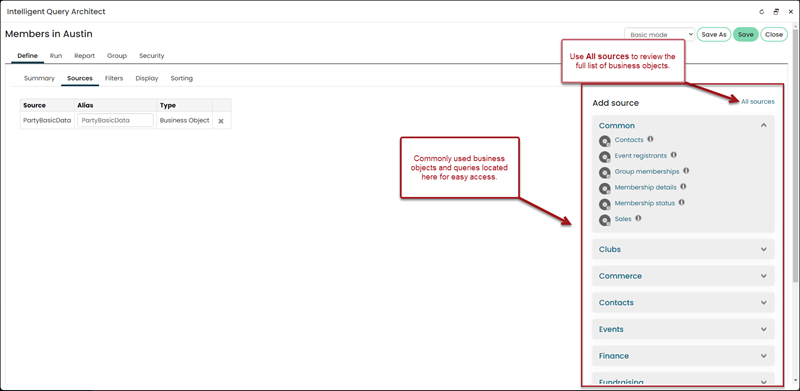
Adding a source
To add a source to this list, do the following:
-
Go to RiSE > Document system.
-
Navigate to $/Common/Query Sources.
-
Do one of the following:
-
Select the folder in which you want the source to appear, or if you want the source to appear in the top Common section, remain in the $/Common/Query Sources folder.
-
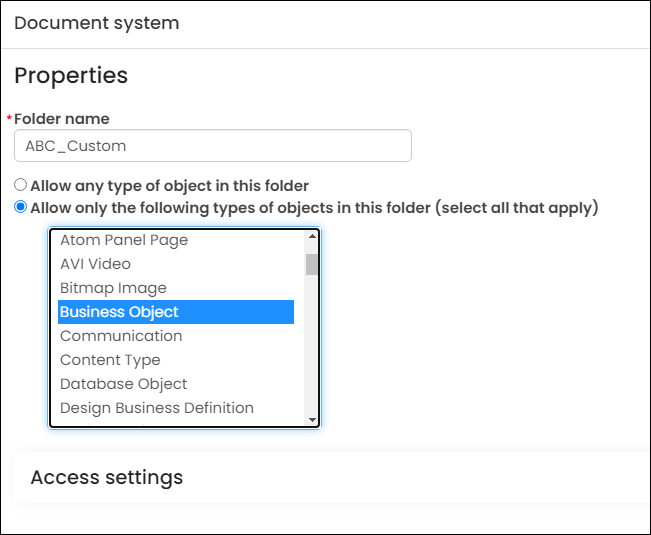
Create a new folder (New > Folder). Make sure Allow only the following types of objects in this folder (select all that apply) is selected. Hold down Ctrl
(Command for Mac), then choose the following: -
Business Object
-
Design Business Definition
-
Folder
-
Query
-
Shortcut
-
-
Select New > Shortcut.
-
Give the source a Document Name. This is the name that will appear in the query definition.
-
From Related document, select the source (query or business object).
NoteBusiness objects are found in the $/Common/Business Objects folder.
- Click Save.
The new source will now appear in the default list.
Updated 5 months ago