

Changing the payment method for AutoPay enrollments
This article covers changing the payment method associated with an active AutoPay enrollment and modifying existing payment methods.
Do the following to change the payment method for an active enrollment:
- Navigate to the member or donor's account page.
- Do one of the following:
- Update a membership enrollment: Click the Participation tab.
- Update a donation enrollment: Click the Giving tab.
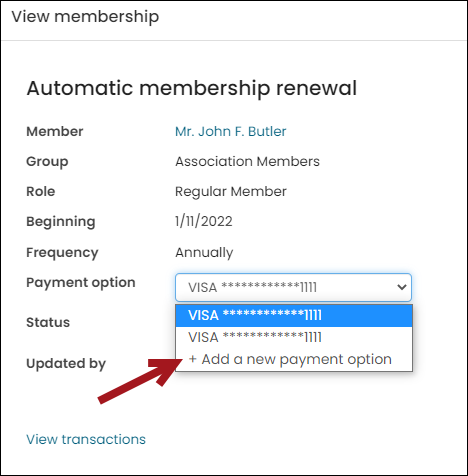
- In the Payment option drop-down, select an existing payment method, or choose to Add a new payment option.
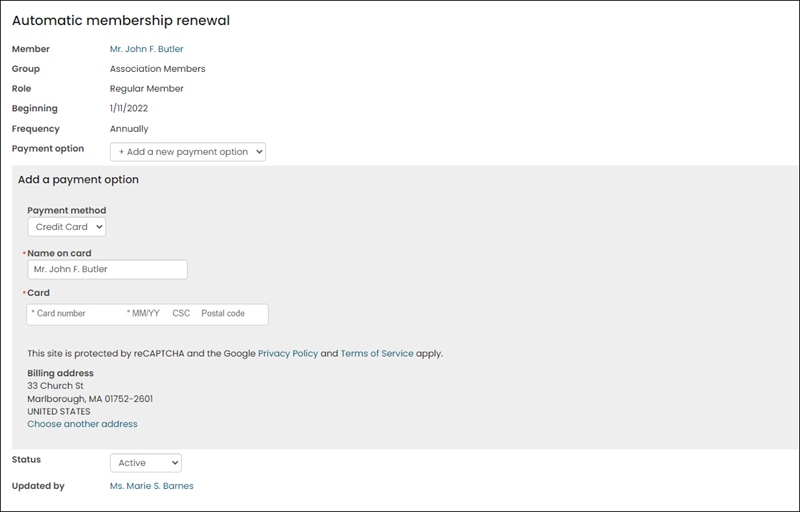
- Enter the required information for the new payment method and Choose another address if the new payment option has a different address.
- Save the enrollment. The selected payment option is now associated with the recurring enrollment and will be used for future payments.
Modifying existing payment methods
WarningThe iMIS Pay and Stripe gateways do not support updating an existing payment method for an AutoPay enrollment. Review Modifying an existing AutoPay payment method when using the iMIS Pay or Stripe gateway to fully understand how to work with this limitation.
To edit an existing payment method, do the following:
- From the contact profile page, click the Preferences tab.
- From the Saved payment options panel, select the payment option you wish to modify and click the edit icon.

- Modify the payment option by changing the Name on card, Expiration date, or address details.
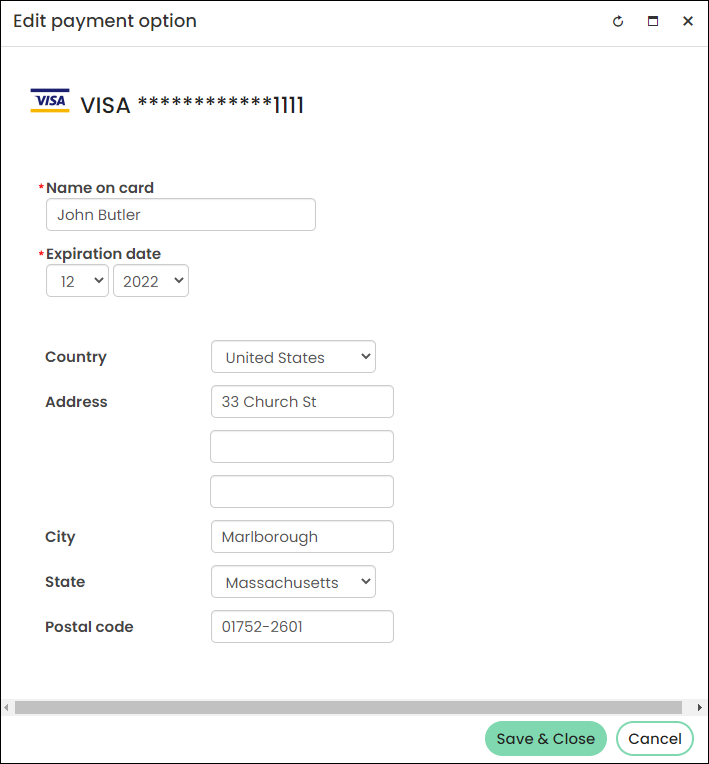
- Click Save & Close. Recurring enrollments associated with the payment option will now use the updated details.
Payment options cannot be deleted if they are associated with at least one active recurring enrollment. Once a recurring enrollment is cancelled, and it was the only enrollment associated with the payment option, then the payment option can be deleted from the Saved payment options list.
NoteACH/direct debits cannot be edited. To associate a new ACH/direct debit with a recurring enrollment, a new ACH/direct debit account must be added, then the recurring enrollment updated with that new payment option. The old ACH/direct debit account can then be disabled.
UK direct debits, however, have different requirements for adjustments. See Direct Debits for more information.
Updated 5 months ago