

Previous Releases
SEPTEMBER 2026 (100.3.183)
Minor fixes and enhancements.
AUGUST 2026 (100.3.182)
Input sanitization added to help prevent malicious code injection
Additional safeguards have been added to detect and remove potentially malicious server-side code from text input fields and WYSIWYG editors (such as the Content Html content item) upon saving. This protection is applied automatically and does not require any configuration by staff users.
In addition to the listed areas, the following areas are also affected:
- The Google Analytics script field in a website's Advanced Options (RiSE > Site Builder > Manage websites). See Managing websites for more information.
- The Text area element under Text & graphics in Form Builder. See Using Drag-and-Drop mode for more information.
APRIL 2026 (100.3.178)
The following enhancements are included in the April 2026 release.
Controlling REST API access to panel sources
To enhance security for panel sources accessed through the REST API, new configuration options are available to control which panel sources can be accessed externally. Administrators can now explicitly define REST API availability on a per–panel source basis, helping prevent unauthorized access to sensitive data.
A new Panel Source Security page has been added (RiSE > Panel Source Security), where you can select a panel source and configure its REST API access settings. A drop-down list displays all available panel sources, allowing you to manage security individually. Out-of-the-box panel sources that use locked business objects cannot be modified and will remain restricted.
See Restricting or granting REST API access to panel sources for details.
Internet Explorer and Edge in IE mode are no longer supported
Following a Telerik component update, Internet Explorer and Microsoft Edge running in IE compatibility mode are no longer supported. iMIS RiSE websites loaded in these browsers will be unusable, as iMIS makes extensive use of Telerik controls. Switch to a supported modern browser - the latest versions of Chrome, Edge (standard mode), or Firefox are recommended.
Other security enhancements
Review the Tech Alert for details.
NOVEMBER 2025 (100.3.177)
Included important security enhancements to strengthen and maintain compliance with the latest security standards.
SEPTEMBER 2025 (100.3.176)
iATS gateway deprecated
Staff users no longer have the ability to add a new iATS gateway. Any questions regarding payment gateways should be directed to your AiSP, CPIL, or [email protected].
FEBRUARY 2025 (100.3.175)
Improved batch creation in staff gift entry
There was an issue that caused intermittent errors (such as "401 errors" or "object object" errors) when creating a new batch in the Entering gifts window. This update resolves those disruptions.
SEPTEMBER 2024 (100.3.174)
Removal of temporary IQA API access methods
As stated in the original documentation for the IQA Security changes, the temporary security fix that granted staff users automatic API access has been removed. To maintain API access, queries must have Available via the REST API enabled.
For more details, see the Tech Alert.
Upgrade notification no longer appears
Previously, a banner appeared that notified staff users that iMIS had been upgraded. With this release, the upgrade banner no longer appears.
APRIL 2024 (100.3.173)
IQA security enhancement
For enhanced security, queries that connect to the REST API must be explicitly set to permit access. To do this, go to the query's Security tab and enable the Available via the REST API option. This action enables API access for the query; however, users attempting to access the query through the API are required to have the appropriate permissions as defined within the query itself. See Granting queries access to the REST API for details.
API endpoint to determine which queries are available to the REST API
To determine which queries have the Available via the REST APIsetting enabled, use the QueryDefinition API endpoint with a request to GetRestAccess. Use a list of DocumentVersionKeys or DocumentPaths as the values. The results return either true or false if the REST access is set or not.
JANUARY 2024 (100.3.171)
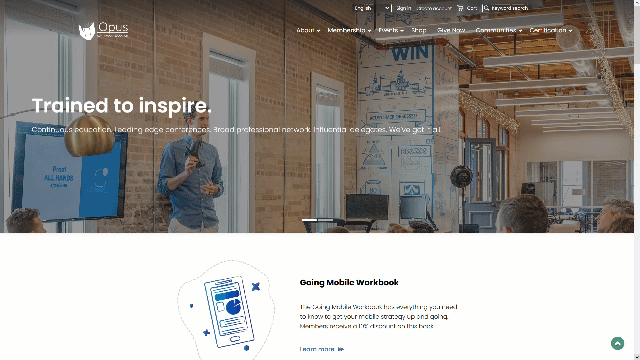
New responsive theme for public-facing sites: Flat White
The Flat White theme is the newest addition to the Coffee family, replacing Mocha as the default theme for the member responsive site. Flat White introduces a cleaner more toned-down style, providing a contemporary and professional appearance. It includes animated content, allowing for certain features like the top navigation to fade in or cards to flip as you scroll down the page. The cleaner aesthetic, animated content, and responsive design collectively contribute to a more enjoyable and effective interaction between members and your organization's online presence.
Using saved payment methods
Empower customers with the convenience of using their saved payment methods on both the cart and Give Now pages, streamlining the checkout process. With this feature enabled, AutoPay enrollees will find their saved payment methods readily accessible. For all customers, the option to add new saved payment methods is conveniently located on their account page on the Preferences tab.
Moreover, system administrators have the flexibility to craft personalized messages that will be visible to customers upon enrolling in recurring donations. See Using saved payment methods for more information.
NoteYou must be licensed for AutoPay to use this feature.

Enhancing the usability of Communication templates
Several usability enhancements have significantly improved the overall user experience within iMIS communication templates:
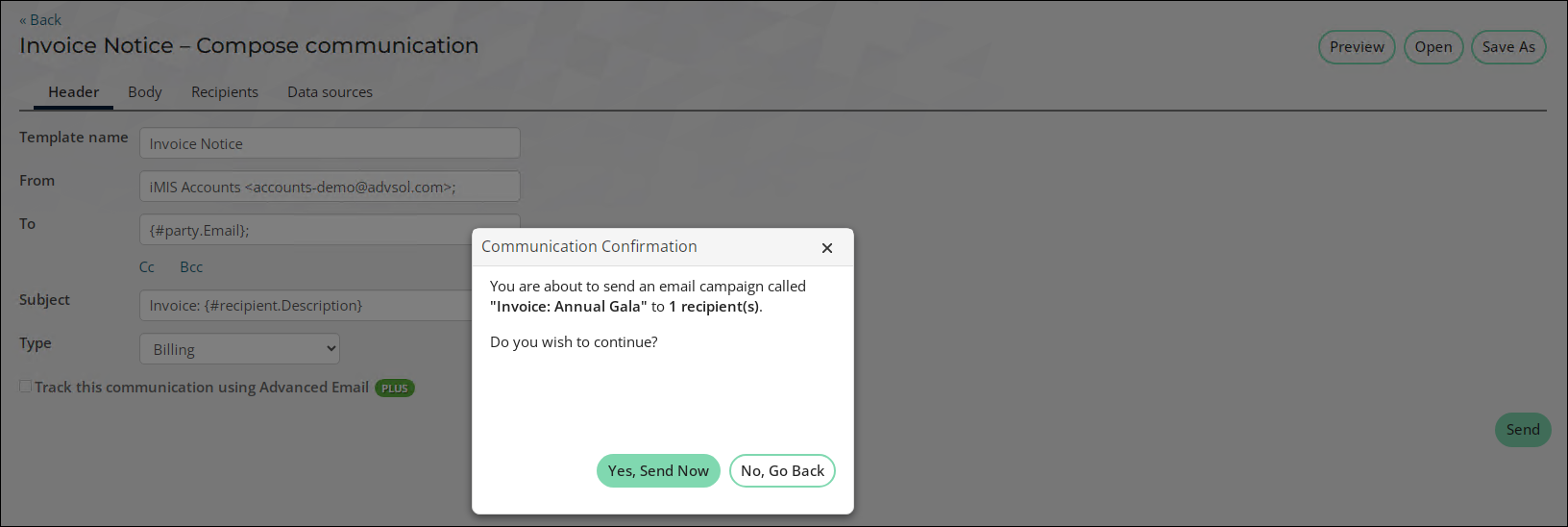
- When initiating communications, a confirmation message will now display, indicating the number of recipients for the communication. Users are provided with the choice to either send the message immediately or return to make any necessary adjustments. This valuable feature empowers senders to double-check their intentions, preventing any inadvertent or premature sending of messages.
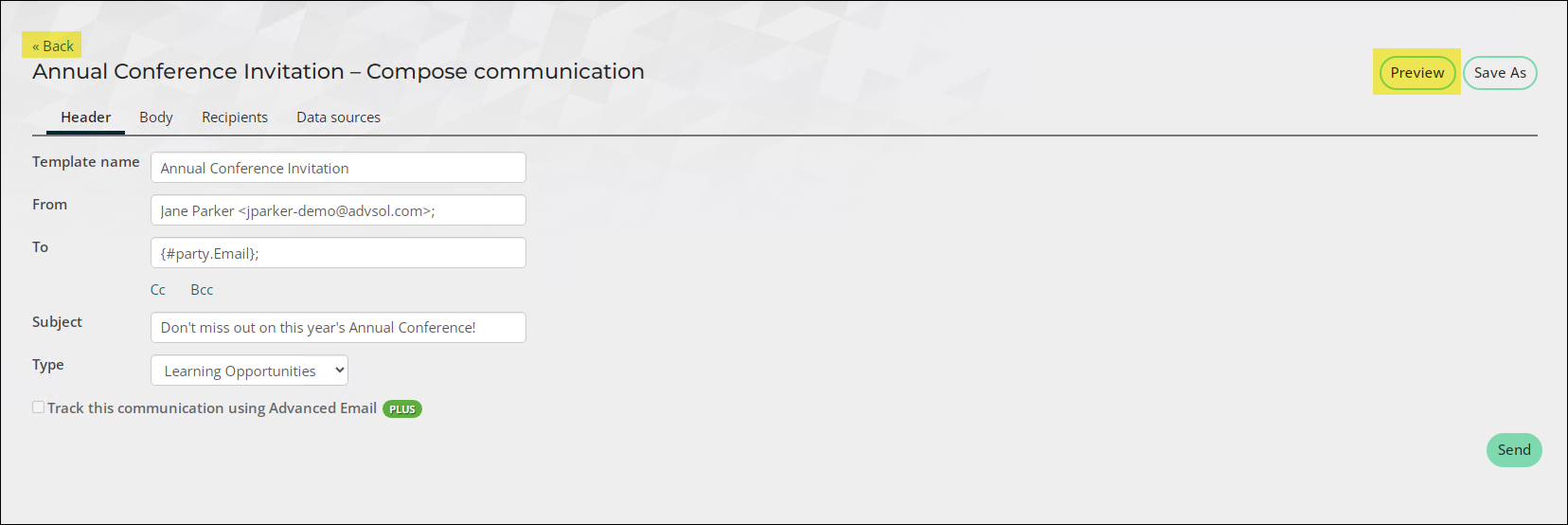
- The Preview button has been relocated away from the Send button, and the Back button has been repositioned to the top for enhanced visibility.
Preventing duplicate contacts in event registrations
The following enhancements have been made to prevent the creation of duplicate contacts when registering someone else for events:
- The Permit public users to register existing contacts setting now prevents public users from creating duplicate contacts they do not have read access to when registering someone else. When enabled, if users choose to Add a new contact and a duplicate record is detected, the existing duplicate is selected for registration, and the new contact is not created. See Event settings for more information.
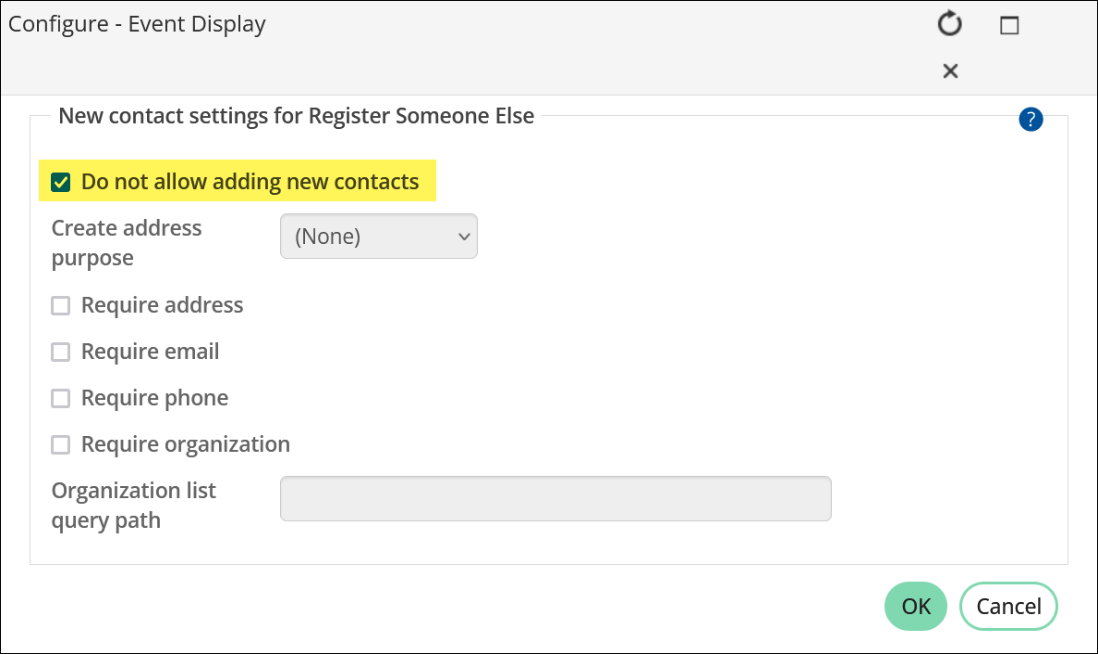
- The Do not allow adding new contacts configuration option has been added to the Event display content item. Enabling this option prevents users from adding new contacts when registering someone else, reducing the likelihood of duplicate entries. See Event display for more information.
Additional Enhancements
- Enhancements to the Stripe onboarding process - The window for adding a Stripe gateway account to iMIS Pay Central now contains two links: Create a Stripe account and Begin the onboarding process. These links are designed to ensure compatibility with pop-up blockers and eliminate the need for users to manually save new Stripe gateways in iMIS. Upon selecting Begin the onboarding process, the new gateway automatically saves to iMIS, and the Stripe onboarding site opens in a new browser tab, without the need for disabling pop-up blockers.
- Okta supported as new OIDC integration - iMIS OpenID is now compatible with Okta. When configured, staff users may sign into iMIS using their Okta credentials. The Okta integration not only offers a seamless single sign on connection to iMIS, but also offers standards-compliant OAuth 2.0 authorization.
- Requiring mobile phone in the Contact Account Creator - The Contact Account Creator content item now offers the option to make it mandatory for contacts to include a mobile phone number during the account creation process.
- Upgrade data displayed on About iMIS page - The About iMIS page has been enhanced to display the date of the most recent upgrade, accompanied by a convenient link to the Release Notes (New Features and Enhancements) page
Upgrade Changes
- Twitter has been changed to X - We've given a fresh look to all icons that used to feature the Twitter symbol, replacing them with the sleek new X icon. Furthermore, all content items that call for social media links have been seamlessly updated to reflect this change.
Updated 13 days ago