

Configuring automatic membership renewals
With AutoPay enabled for Membership, when prospective members join an organization or when they renew their memberships, they can select an option to have their future membership renewals automatically paid.
NoteFor UK Direct Debit with AutoPay: Automatic membership renewal term spans of one month (monthly), three months (quarterly) and 12 months (annually) only are supported.
Before you begin
Before configuring renewals for AutoPay, make sure Allow users to create auto-renewing memberships is enabled under Settings > Finance > Pay Central > Automatic payments. For more information, see Configuring the AutoPay settings.
Additionally, it is recommended to review the AutoPay: Getting Started Guide if you are setting up AutoPay for the first time.
Once the above are completed, do the following to allow members to enroll with recurring membership payments:
Displaying AutoPay as an option for members
As soon as you enable the auto-renewing membership option (performed in Configuring the AutoPay settings), new members are able to enroll in automatic renewals. Edit the General Product Display content item located on your Join Now page to update the automatic-renewal text.
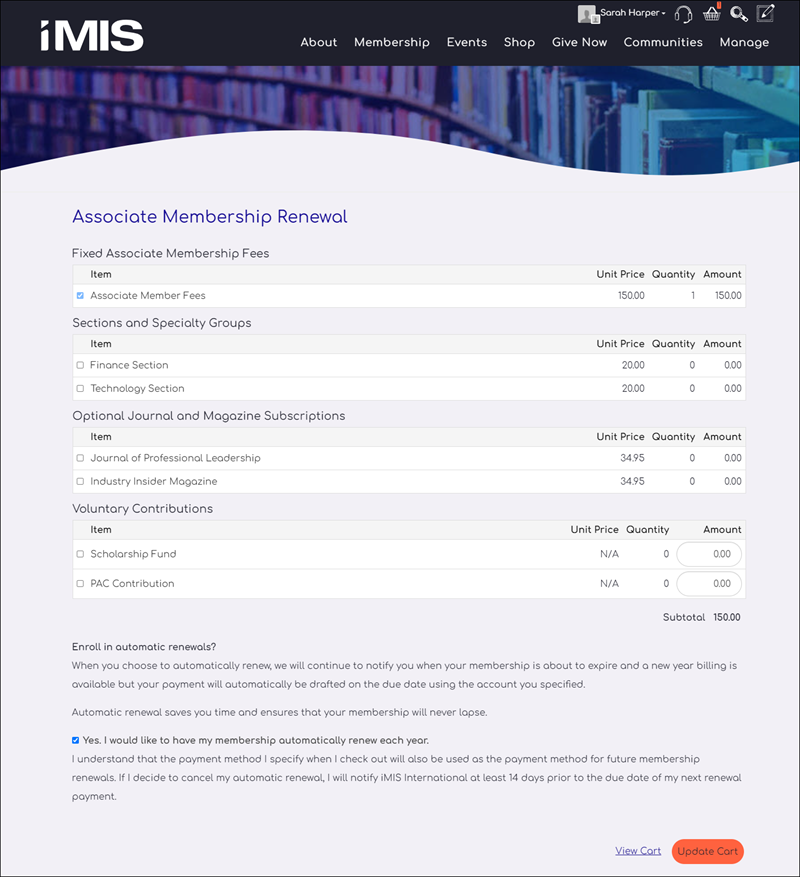
The Enroll in automatic renewals? option is displayed if the product being looked at or any of its child products adds the purchaser to a group subject to renewal billings and for which a renewal product is defined. The group must also be flagged as Is Member.
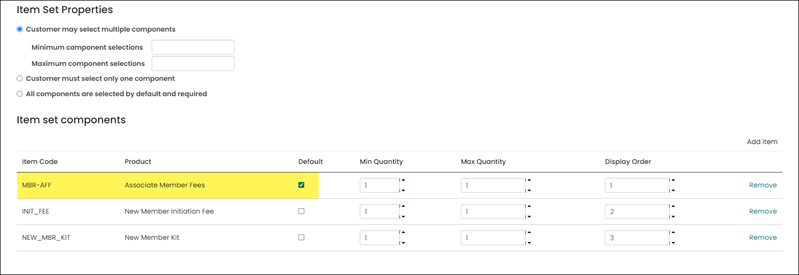
If you are using a collection of membership products that is not a kit, make sure the product that adds you to a membership group is selected as Default.
Next steps
To finish setting up AutoPay, review and configure the following:
- Enable the Retrieve processed payments from Pay Central task.
- (optional) Allow members to cancel their own enrollments without staff assistance. See Allowing members and donors to cancel their own enrollments.
To begin enrolling members with AutoPay, see Enrolling a member with AutoPay.
Updated 5 months ago