

Open Invoice List Display
The Open Invoice List Display content item allows users to pay listed open invoices. This content item should be placed on the individual and organization account pages. This content item allows users to select which invoices they would like to add to their cart for payment instead of paying for every open invoice.
NoteThe Open Invoice List Display content item supports displaying up to 1000 open invoices for a contact.
This content item can be seen out-of-the-box on the contact Account page (@/iCore/Contacts/Account).
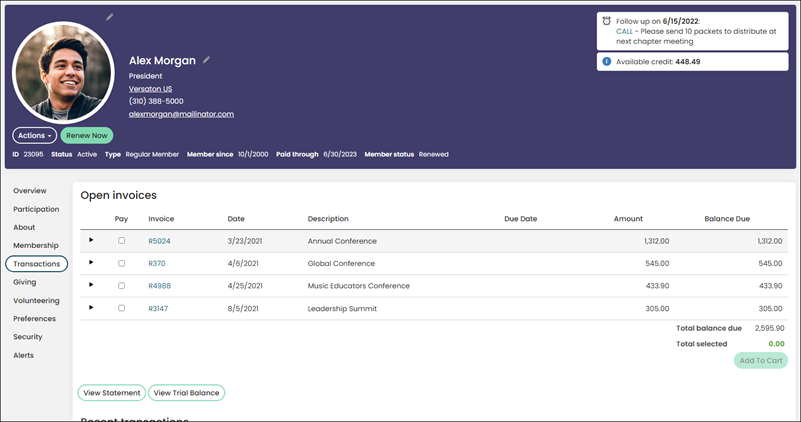
This content item uses the Common content item configuration options, in addition to the following:
- Limit users who can view data for other contacts - (enabled by default) If this option is enabled,
only authorized users can view information for contacts other than themselves. This prevents other users from changing the ID in
the URL to access another contact's data. Authorized users include staff and Group Member Administrators for a group to which the contact belongs.
Disable this option to allow all users to view information for other contacts, such as for a public profile. If this option is disabled,
the system security settings determine whether a user must be logged in to view information for other contacts. - Display options when no invoices are due - Select the option to determine how the content item is displayed when there are no open invoices due:
- Hide content - When no invoice is due, the content item is not displayed.
- Show empty grid with message - The empty grid is displayed with the No open invoices message displayed in the middle of the grid.
- No open invoices message - (required) Enter a message to be displayed when there are no open invoices due.
- Include the following invoice types – Select the invoice type you want displayed in the Open Invoice List Display content item. You can select multiple invoice purposes to be shown on the same instance of the content item:
- Regular – An invoice created from product orders and event registrations, and for charitable donations.
- Pledge – An invoice created as part of a charitable donation that is to be paid later.
- AutoPayPledge – An invoice created by the Process recurring donations procedure.
- MembershipRenewal – An invoice created by the Generate renewals procedure for a membership group.
- AutoPayBilling – An invoice created when initially joining a membership group using an ACH payment method where the member enrolled in automatic renewals. The payment is delayed to allow the generation of an AutoPayAccount and the invoice which must be submitted to Pay Central to be processed.
- AutoPayRenewalBilling – An invoice created by the Generate renewals procedure for a membership group where the member is enrolled in automatic renewals.
- Include only invoices due within [n] days – Limit the invoices that are displayed in this content item. If the Due Date on the invoice does not fall within the date range specified, the invoice will not be displayed. If this option is not selected, the field is disabled.
NoteThis option is disabled by default. When enabled, the default value of this option is 60.
Updated 5 months ago
Did this page help you?