

iMIS Pay FAQ
Will iMIS Pay Central work with my iMIS system? iMIS Pay Central works on iMIS EMS.
Which cards can I accept with iMIS Pay Central? All major credit/debit cards: Visa, MasterCard, Discover, AMEX, Diners, JCB, Union Pay, Maestro etc.
Does iMIS Pay Central support ACH/eCheck transactions? Yes. iMIS Pay Central offers fully integrated direct debit ACH processing.
Can I set-up multiple iMIS Pay Central merchant accounts? Yes. iMIS Pay gives you the ability to link certain data, like credit cards on file, across multiple locations providing a seamless user experience for you and your customers.
NoteIt is recommended to use one merchant account per website.
Do I need to keep my current accounts with Visa/MC/AMEX when using iMIS Pay Central? No. The benefit of using iMIS Pay Central is that it gives you a complete end-to-end payment solution with one point of contact--- all at no additional cost. You can count on iMIS Pay Central for anything merchant services related.
Can I keep my relationship with my local bank? Yes. iMIS Pay Central supports next day funding directly to your bank account.
Can iMIS Pay Central save my staff time on credit card processing? Absolutely! You’ll save countless hours by not having to work between two separate systems to run your business and manage your payments. You have the capabilities to store cards on file and charge them automatically. In conjunction, with Decline Minimizer you no longer have to worry outdated credit card information, which has expiration dates and reissuance.
What currencies does iMIS Pay Central process? United States Dollar, Euro, Pound Sterling, Australian Dollar, Canadian Dollar and New Zealand Dollar
**When can I expect to receive my deposits?**With the possible exception of your first deposit, you can expect each daily deposit within 48 hours after your daily automated settlement (subject to the funding timeframe of your receiving bank). If the 48-hour timeframe falls on a weekend or holiday, the deposit will be made the next business day. Depending on your receiving bank, the funding may be as follows — transactions run Thursday may be deposited on Monday, while Friday, Saturday and Sunday’s batches would deposit as separate, individual transactions on Tuesday.
Can I accept credit card payments with my mobile phone or tablet? Absolutely. iMIS Pay Central supports transactions on your iPhone, iPad and Android device.
Can I process transactions remotely at any time? Yes. Using iMIS Pay Central from your computer, tablet or mobile device you’ll have unlimited access for processing payments 24/7/365. iMIS Pay Central even offers “Offline Processing” in certain countries, allowing you to continue processing payments even without internet/cellular connection.
Which mobile phones and tablets are compatible with iMIS Pay Central? iMIS Pay Central supports current and previous iOS operating systems for iPhone, iPad, and iPod Touch. iMIS Pay Central also supports current and previous operating systems for all Android mobile phones and tablets.
Does iMIS Pay Central provide the end customer with a receipt or confirmation of payments? Yes. iMIS Pay Central can provide physical printed receipts, as well as email receipt confirmations. iMIS Pay Central will store a copy of all transactions, allowing you to retrieve and resend receipts at any time.
What type of reporting is available? iMIS Pay Central provides unlimited 27/7/365 access to a secure, online portal allowing you to view transaction details in real time, run customized reports, view batch and settlement history, and reconcile bank statements.
Is it safe to use iMIS Pay Central? Absolutely. iMIS Pay Central is PCI 3.0 certified and maintains the highest level of security in the industry. iMIS Pay Central utilizes end-to-end encryption for all card present and card not present transactions. Card data saved on file is tokenized and stored offsite in iMIS Pay Central’s secure Token Vault. iMIS Pay Central users are also eligible to receive $100,000 in breach protection through our PCI Assure program.
Is iMIS Pay Central Mobile credit card data secure? Yes. iMIS Pay Central Mobile supports PCI compliant encrypted EMV credit card readers, ensuring that sensitive credit card data is never stored, processed or transmitted through your phone, tablets or servers.
What fraud-prevention features are available in iMIS Pay Central? iMIS Pay Central’s security team provides 24/7/365 fraud and risk monitoring. iMIS Pay Central’s Fraud Awareness Program is also available to assist in preventing fraud before it ever happens. Unlike several of our competitors, iMIS Pay Central delivers enhanced fraud monitoring at no additional cost.
Can I process recurring transactions with iMIS Pay Central? Absolutely. Single transactions, as well as repeat and recurring transactions are supported with iMIS Pay Central.
How can iMIS Pay Central help me keep credit card data, such as expiration dates, current? iMIS Pay Central offers an all-inclusive Account Updater service called Decline Minimizer. Decline Minimizer analyzes your credit card data on a nightly basis, looking for expired, lost and reissued cards. iMIS Pay Central seamlessly updates outdated credit card information every day--- without any involvement on your end.
NoteDecline minimizer is supported in North America but is not supported in Australia or New Zealand.
Is there an additional fee for the Credit Card Updater service? No. There are no additional fees for the Credit Card Updater solution. Unlike other competitors, our solution checks for outdated credit cards every night before the decline even occurs.
How do I sign up for the Credit Card Updater? No additional work is required on your end. The Credit Card Updater service is already included with your iMIS Pay Central account.
How do I complete my end-of-day settlement? Your batch is settled automatically every day. By default, this time is set to 2 a.m. your local time. You do not have to initiate the settlement yourself. You can even turn off your computers without interfering with the automated settlement. Your transaction and batch reports can be accessed through OpenEdge View directly.
Do I need to notify my bank that I have a new processor? In most cases, your bank will not need any additional information in order for you to begin receiving your deposits. However, it’s always good practice to notify them that Global Payments Integrated is your new processor and confirm that there are no holds or blocks that need to be removed. The deposits will be coming from Global, and will be identified by your Merchant ID.
Where can I go to confirm my transactions went through or get daily batch totals? OpenEdge View is a powerful tool that will allow you to view a transaction’s status in real time. Within seconds of the transaction being completed in iMIS, you will see the transaction appear in OpenEdge View. There is a report specifically dedicated to your end-day batch report —depending on your settings, this may reflect the amount that will be deposited into your account. OpenEdge View also has customizable reporting that lets you look at transactions from any period of time or specific card brands and allows you to make custom filters that you can add into the reporting.
Where can I see my monthly statements? Each month, Global Payments will mail you a paper statement. In addition, they have a powerful tool where you can access electronic statements online. This resource provides a wide array of processing information, including statements, deposits and chargeback cases — all available at your convenience, 24/7.
Where can I view my or deposit information? To view a batch that was deposited into your account, please visit the Global Merchant Portal.
Where can I view and contest chargebacks? Any chargebacks can be found on the Global Merchant Portal. You will receive notifications of any disputes and can address them via the Dispute Manager system.
What is the difference between iMIS Pay, Pay Central, and Pay Central Service?
- iMIS Pay is the name of the gateway that you set up in iMIS.
- Pay Central is the naming convention of all payment related areas in iMIS. This applies regardless if you are using the iMIS Pay gateway.
- Pay Central Service is the new name for DataVault.
What are the costs associated with the transition? After you have filled out the form with Global Payments or Ezidebit, an analyst will contact you to review the costs.
(North America only) What do I need to go to the Global Payments portal for?
- For reporting, go to the Global Payments portal to view transactions and run reports as necessary. Go to the Global Payments portal and log in with your username and password (assigned during installation).
- To view transactions from the portal, select the Transaction tab.
- To generate reports, select the Reports tab. Review the features and functions of Global Payments video for more information.
Do I need a license for AutoPay when using iMIS Pay? You will only need an AutoPay license if you need to process recurring transactions.
What happens to my automatic enrollments? All cards used in AutoPay are encrypted in the iMIS Pay Central Service (previously known as DataVault) and will remain encrypted in the iMIS Pay Central Service when you transfer to the iMIS Pay gateway. Automatic enrollments will continue as scheduled.
How are refunds performed with the iMIS Pay gateway? Refunds are performed directly from the iMIS Staff site. See Refunding payments for more information.
Is there a payment privacy policy regarding iMIS Pay? Yes, the following are just a few of the security standards that ASI adheres to:
- iMIS does not maintain any card data after the initial purchase or donation with iMIS Pay Central. For recurring payments, such as membership renewals or donations, the card data is tokenized before the card data is destroyed. This token is then used for the ongoing gifts or memberships.
- iMIS does not process, store, or transmit cardholder data. Therefore, PCI compliance of the application is not required. Cardholder data is only handled by the iMIS Pay Central Service that is hosted by ASI, which is audited for compliance annually by a QSA company.
- iMIS Pay is PCI compliant
- iMIS (including Pay Central) is GDPR compliant
- iMIS Pay is ISO/IEC 27001:2013 certified
For more information regarding security or privacy, please visit the ASI Data Protection Center.
Is there a limit on cardholder name length? Yes. According to ISO IEC 7813:2006 the cardholder's name length must be 2 to 26 characters including first name, last name and spaces. iMIS will use the customer’s name by default and issue a warning if it does not meet the length criteria.
How are my payments processed? Pay Central contacts the gateway and gets a confirmation back immediately regarding the payment; this confirmation is a request to take the payment, not a confirmation of the payment being taken. As such, it is advised that you check both iMIS Pay Central and the gateway portal to ensure that the payment has settled successfully.
Can iMIS Pay act as a passthrough gateway? No. The iMIS Pay gateway cannot be used as a passthrough or connection to other payment gateway providers.
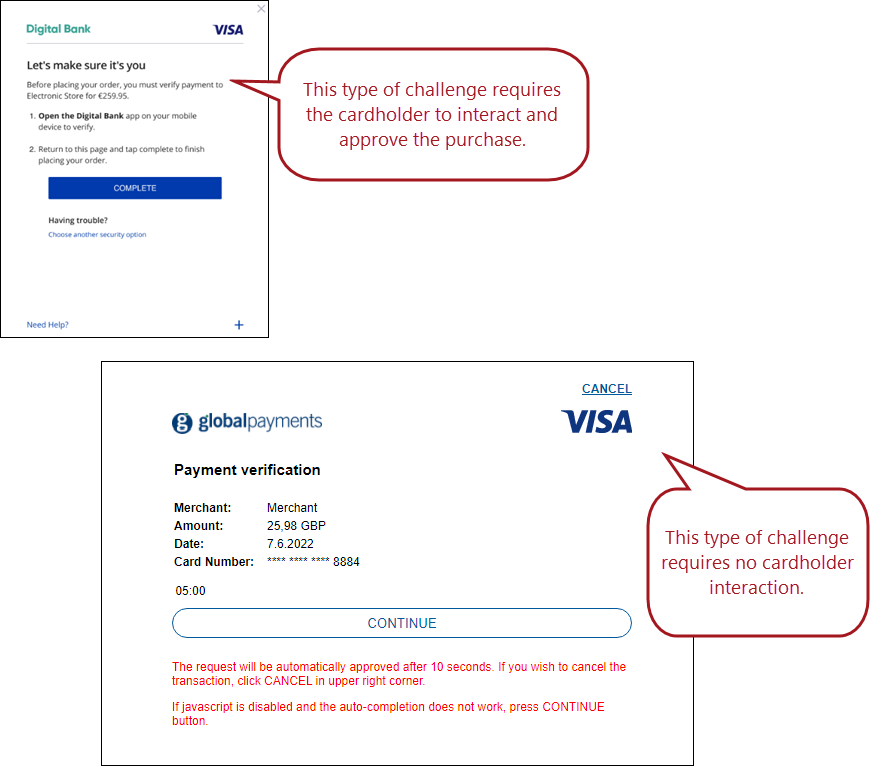
Why did I get a pop-up asking me for approval? Customers may see a “challenge window” when making purchases through the iMIS Pay gateway. This is an added 3D Secure measure to ensure your payments are protected. Although most transactions will follow the “frictionless flow” where no challenge window is presented, your bank may opt for the “challenge flow” if they believe there is an increased risk. See the image below for different types of challenge windows.
NoteThe challenge window presented to the cardholder varies by bank, so your challenge window may look different than the images below.
When do my batches settle? Global Payments automatically settles batches at 2:00AM Pacific Time (UTC-8) each day.
Updated 5 months ago