

Address Verification Service (AVS)
iMIS can perform real-time address verification using the Address Verification Service (AVS). There are several benefits to this:
-
Running this verification through the ASI web service frees you from having to install and maintain these data files locally.
-
Offloading verification to this service prevents adding to the processing load of your page.
-
The services of different address providers can co-exist, making it possible to verify addresses across multiple countries.
-
The service can support future verification of collections of addresses as well as single addresses.
-
Postal addresses entered in the Contact Account Creator and Contact Address Editor content items are automatically uploaded to this service. The service verifies and standardizes the address. Users can then either accept the suggested address or keep the original as it was entered.
When users select United Kingdom from the Country drop-down in either of these content items, a Postal lookup field appears, allowing users to search for an address using a postal code. Users can then select the correct address from a list of returned addresses generated by the iMIS address verification service.
The countries supported by this service are subject to change. Currently, AVS supports the following countries:
- United States
- Canada
- Australia
- New Zealand
- United Kingdom
US addresses:
- USPS PO Boxes often have dedicated zip codes. In these cases, iMIS might return the address as a 9-digit zip code and eliminate the PO Box line, for example:
Entered address Address AVS returns PO BOX 537007 Sacramento, CA 95853 Sacramento, CA 95853-7007
- However, private PO boxes in the US do not have their own zip code, for example, PO boxes at a UPS store.
- US addresses are automatically paired with congressional districts. To display the US Congress property in a Panel Editor or use the data in a query, use any of the contact business objects, for example, PartyWithDefaultAddressData.
Canadian and UK addresses:
- For Canadian addresses, it is important to note that the mailing address and the physical address are not the same thing. The AVS only verifies postal addresses (for example, PO boxes), but not physical addresses (for example, suite numbers). The address that is validated is the address the post office has told you to use.
- It is important to include the PO box when there is one.
- The AVS is only going to accept proper postal addresses recognized by the post office.
- For UK addresses, it is important to note that storing counties in the States and Provinces table is not supported. Adding counties under Settings > Addresses > States and Provinces will prevent the County field from being automatically populated by UK postal lookup.
Disabling the AVS
The AVS can be disabled on specific content records only or system-wide.
Disabling the AVS for specific content records
In some instances, you may not want the address verification service to validate or suggest addresses, such as on Give Now donation pages that are designed for quick, on-the-fly giving.
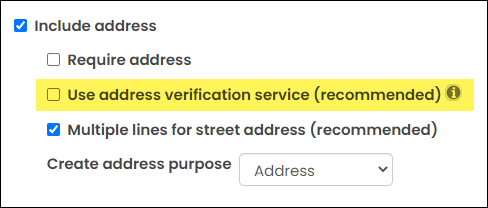
To disable the address verification service, you must disable the Use address verification service (recommended) checkbox on the Contact Account Creator. If you have multiple content records with their own instance of the Contact Account Creator, the checkbox must be disabled on each instance.
Disabling the AVS system wide
Although not recommended, the Address Verification Service can be disabled.
Do the following to disable the Address Verification Service:
- Go to Settings > Contacts > General.
- Deselect the Use address verification service (recommended) setting.
- Click Save.
Updated 3 months ago