

Basic campaign example: Professional conference
The following is an example of a basic campaign for a professional conference.
Planning a basic campaign
The ABBA professional society holds a fundraising drive each year. The goal of the annual fundraising drive is to raise 20% more funds than last year. This campaign uses two source codes to test the effectiveness of two marketing emails. You'll also need to create marketing emails and include hyperlinks in each email to your website donation page. The hyperlink in each email should be associated with its own source code, allowing you to track the responses generated by that particular email. See Assigning source codes to hyperlinks for more information.
The hierarchy for this campaign is simple:
- Campaign - Annual Fundraising Drive
- Source Code (000134) - Email A
- Source Code (000135) - Email B
Defining the campaign
Do the following to add a new campaign:
- Go to Marketing > Campaign > Manage campaigns.
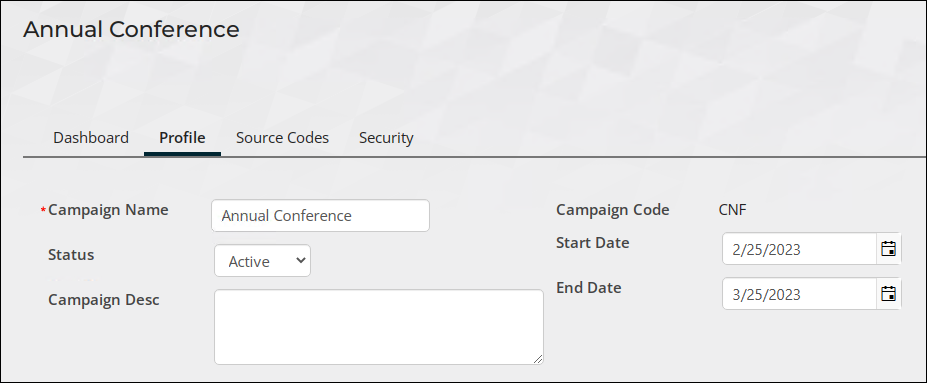
- Enter the following information:
- Campaign name - Annual Conference
- Campaign code - CNF
- Status - Active
- Start date - today's date
- End Date - a month from today's date.
- Click Save.
-
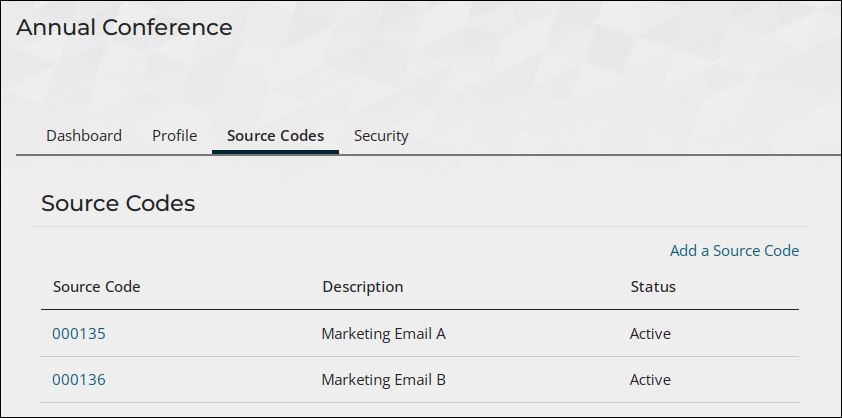
(Source Codes tab) This is the point at which the source codes are defined and associated with hyperlinks in the marketing emails. Do the following to set up the two source codes:
- Select Add a Source Code. Enter the following information:
- Code - 000134
- Description - Marketing Email A
- Source Code Status - Active
- Target Revenue - $7,500.00
- Click Save.
- Create the second source code:
- Code - 000135
- Description - Marketing Email B
- Source Code Status - Active
- Target Revenue - $7,500.00
- Click Save.
- Select Add a Source Code. Enter the following information:
Updated 5 months ago