

Household Editor
The Household Editor content item display members of the selected household group. You can configure the Household Editor content item to best fit your organization.
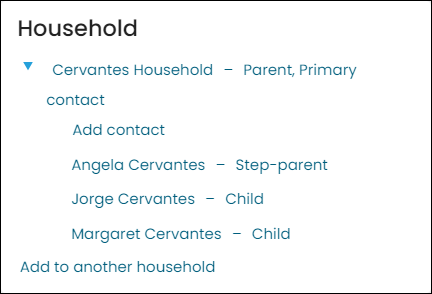
Household Editor configuration options
This content item uses the Common content item configuration options, in addition to the following:
-
Limit users who can view data for other contacts - Select this option to hide the content if the user viewing the page does not have access to edit the selected content.
-
Description - If you want to display a description within the content item, enter the text here.
-
Mode:
- Display members of the selected household group - Select this option to display all members of the selected household group.
- Display households that the selected contact belongs to - Select this option to display households that the selected contact belongs to. When this option is enabled, the Allow adding to multiple households and Allow expanding lists will be available options.
- Default role(s) when new household is created - Select all the role(s) that you want to be default roles when the new household is created.
-
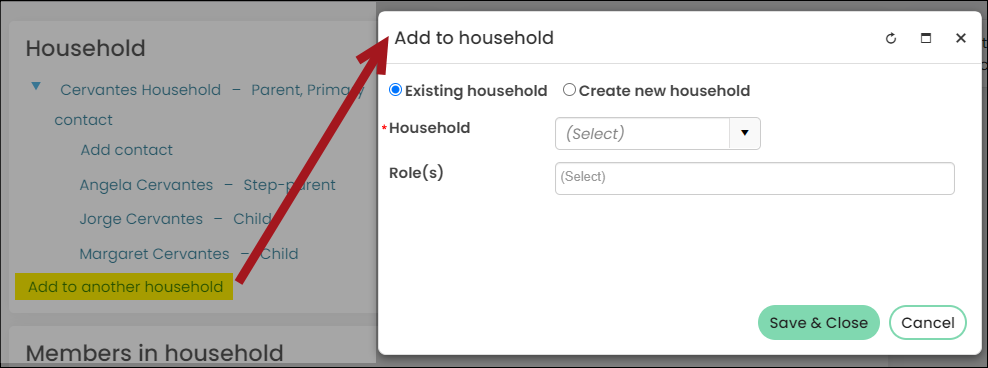
Allow adding to multiple households - Select this option to allow contacts to add themselves to multiple households. This option can only be enabled when Display households that the selected contact belongs to option is enabled.
- When this option is enabled, the Add to another household link will appear. Select this link to add an existing household or to create a new household.
-
Display profile image - Select this option to display profile images as thumbnails in the household list
-
Show inactive memberships - Select this option to display both current and expired members within a household list. If this option is note selected, only members with current memberships are displayed.
-
Allow expanding lists - Select this option to display an expandable list of household members and household group details. When enabled, this option allows users to see all the members by expanding a household group to see additional details. This option can only be enabled when Display households that the selected contact belongs to option is enabled.
Notes
- The Primary Contact in the household group is the only contact who can add and edit household members in the group.
Updated 5 months ago