

Membership renewal processing rules
The following are some basic rules to be aware of when you are preparing to perform a membership renewal:
Membership renewal definitions to understand
- Target group - The group for which the renewal is being generated. You select this group when you run the group renewal process.
- Secondary group - Any group that is not the target group, but is associated with a product in the renewal product set .
- Eligible for renewal – A group member is eligible for renewal processing if the End Date of the member detail record is earlier than the Effective date for the renewal being generated. Detail records can be seen if you select the member from the group’s roster listing.
- In the Staff site, go to Settings > Groups > Manage groups.
- Select a group.
- Click the Edit an item (pencil) icon to edit the group. An Edit Group window is displayed.
- Scroll down to the Renewal Policy area.
- Make sure Group Membership is subject to renewal billings is selected. Enable Include inactive members to also include inactive members when processing renewals. If this is not enabled, only active members of this group will be processed for renewal.
- For the Renewal selection criteria, enter the Include members expiring within amount. This is the amount of time to run the renewal process before a contact’s Expiration Date. For example, if Joan Martinez’s subscription ends on December 31 (the Expiration Date) and you want to process her renewal two months in advance, enter 2 Months. See Setting up fees for more information.
- Save your changes.
- Mandatory products in a product set – If the minimum quantity for an item is greater than 0 when you define the contents of a renewal product set, then the item is considered to be mandatory. The item cannot be deselected during payment of your renewal invoice.
- Associate Membership Fees
- Sections and Specialty Groups
- Optional Journal and Magazine Subscriptions
- Voluntary Contributions
Click for details
👍 Example
👍 Example
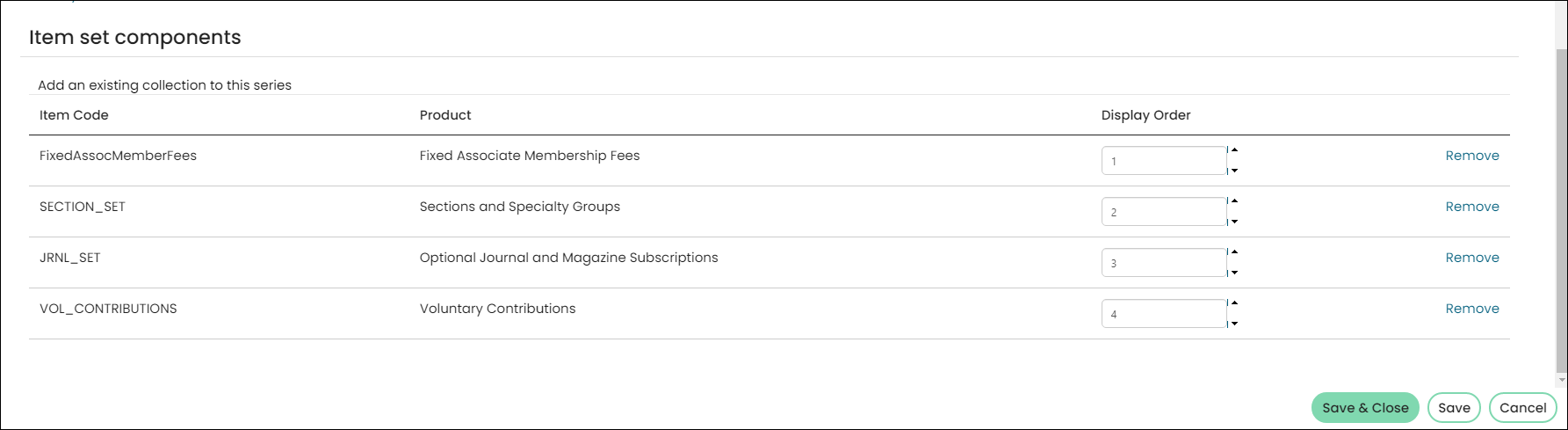
The Associate Membership Fees are the target group. However, the secondary Sections and Specialty Groups, Optional Journal and Magazine Subscriptions, and Voluntary Contributions can also have group memberships. Those group memberships are also eligible for renewal for the members who have joined those secondary groups.
Click for details
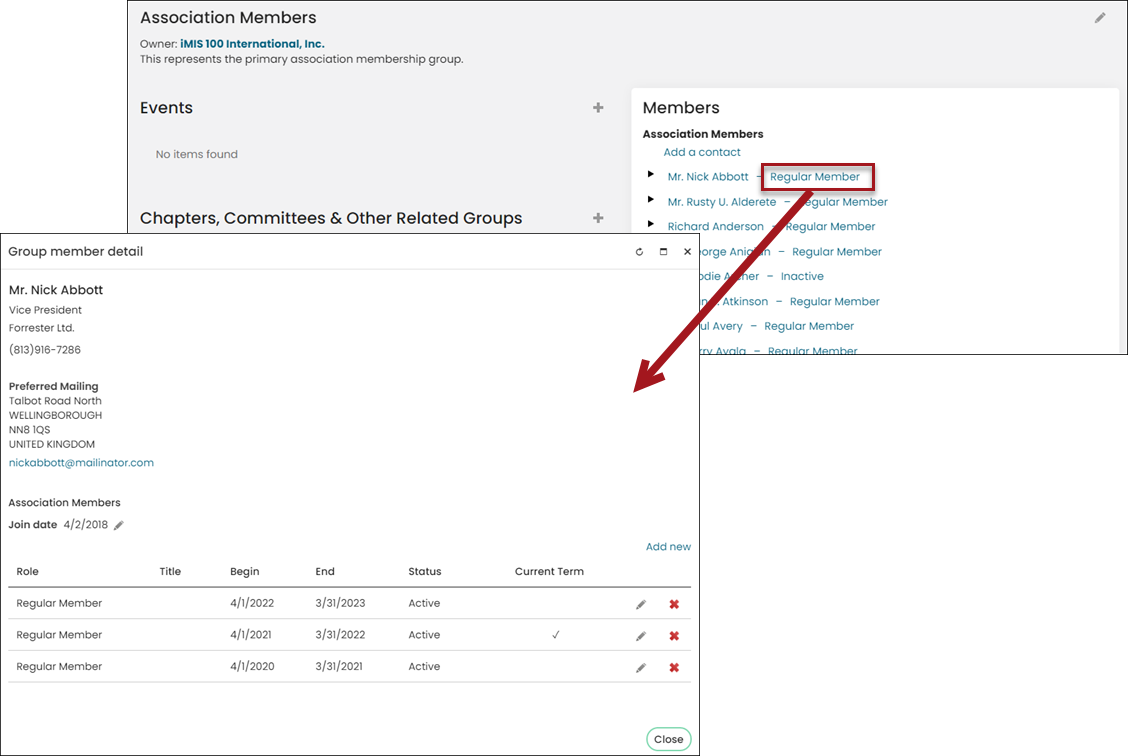
he Effective date is calculated as the date entered for the group renewals Run date, plus the number of Days, Months, or Issues specified in the Selection Criteria. Users can specify an Effective date when processing a membership group renewal.
📘 Note
Renewals with a blank Effective date cannot be submitted. Once you supply an Effective date, the date is not changed automatically when you modify the Run date, group, or user.
The Selection Criteria can be edited by doing the following:
Click for details
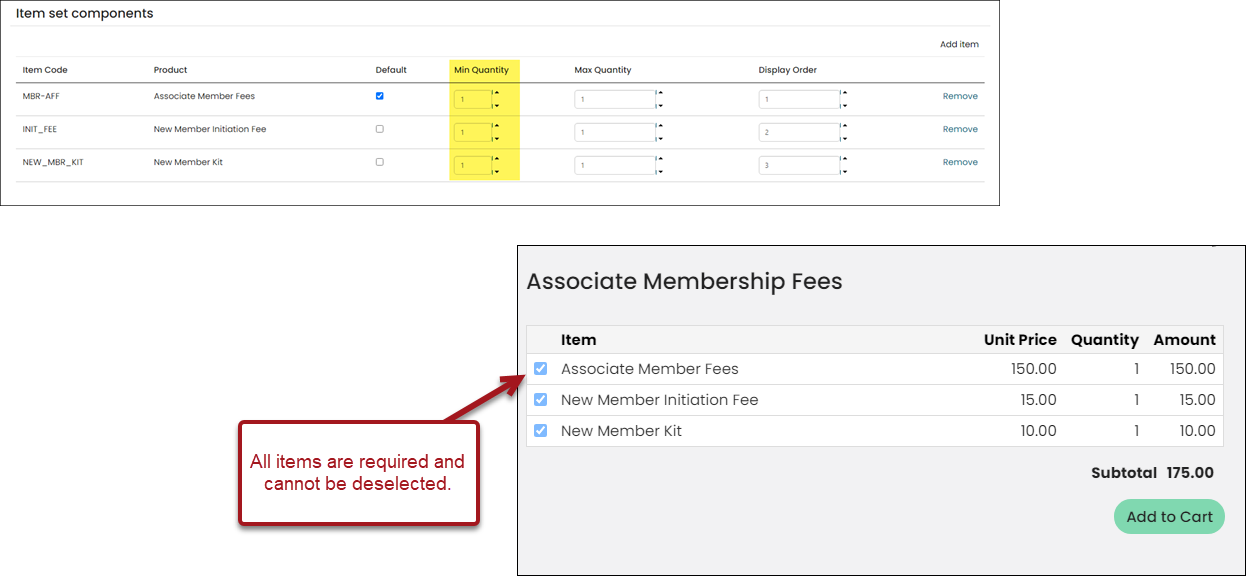
Consider the Join Now page for an Associate Membership. The Associate Membership is comprised of four different Product Set Items:
Each of these items in the Product Set Items list are comprised of their own Product Set Items. In other words, they are Product Set Items within a larger Product Set Item.
📘 Note
The first item in the renewal product set determines the group to which the member is added when the membership is renewed, as well as the frequency of the AutoPay enrollment.
For more information, refer to Payment terms and Adding a product class.
The secondary Product Set's items translate to the individual lines you see on the Join Now page. To modify specific lines of the secondary Product Sets, you must find the product. Go to Settings > Commerce > Manage products.
Membership renewal rules to consider
The following must be taken into consideration before renewing membership:
- Each item in the renewal Product Set must be unique. An item cannot be added to a Product Set twice.
- You cannot run a renewal for a group if there is an unposted batch for that group. The presence of the unposted batch indicates that a renewal has already begun processing for this group. Post or delete the unposted batch before running another renewal.
- If an individual or company account is eligible for renewal but has already been billed for a renewal period using cash accounting basis, and has not paid that renewal, further renewal invoices for later dates will not be generated:
- If you are on accrual basis dues, then not paying your renewal invoice does not prevent generation of renewal invoices for later periods.
- The assumption is that if you are on cash accounting basis, the unpaid invoice prevents members from receiving benefits of membership as they are not active until they pay. Until members pay the existing invoice, there’s no point in generating another invoice.
- If you are on accrual basis dues, the contact is treated as a member with active status, whether or not the invoice has been paid.
- Only active members in the target group will be considered for processing. This means that the Group Member record, not the Group Member Detail record, must contain one of the active statuses. To see which status codes are considered active, see the definitions for the Group Type Roles.
- Only those roles which have been defined in the Group setup as having renewal products will generate renewal invoices. Edit the group and view the Renewal Policy section to see which roles have been assigned a renewal product. If no renewal product is assigned for a role, no renewal is generated.
- All groups (target and secondary) are reviewed for each active member to see if that group membership is eligible for renewal. If the target group is not eligible, but a secondary group is eligible, then the secondary group should be renewed and the target group should be bypassed.
- Products in a renewal product set that do not confer membership in a group should only be included in the renewal invoice if the target group is being renewed, and only if the product is mandatory.
- Annual primary membership (group)
- A six month newsletter (group)
- Annual membership directory (for a fee, no group, minimum quantity is 1 so it is mandatory)
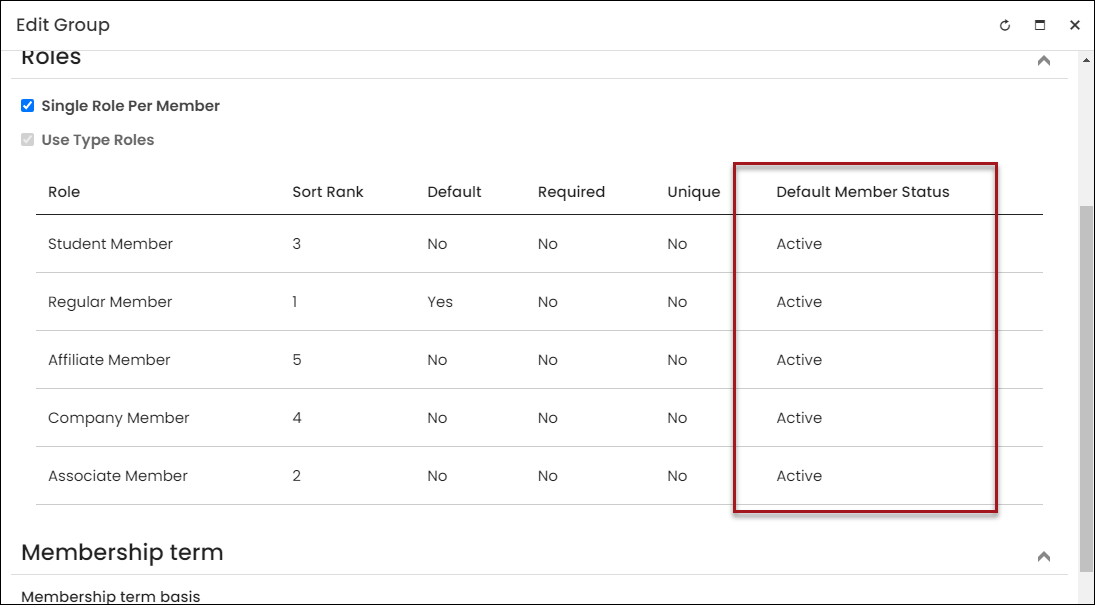
- The Role on the membership renewal for each line item in the renewal invoice will depend on the Role that is indicated in the renewal product. See the Renewal Policy section of the Edit Group page to view. As a result, a renewal can cause a change in the role of a member.
- Adding a group-related product to a product renewal set will not automatically generate billing for that product. For example, adding a new journal to an existing Association Membership renewal product set will not generate bills for all members of the Association Members group.
- Adding a product that is not group-related to an existing product set will cause the next renewal invoice for the target group to include that line item.
- Renewal products should not contain product collections that are collections of products shown separately, and that are individually priced.
Click to view image
Select the pencil icon from the group page, and scroll down to Roles:
Consider a renewal product that consists of the following:
Whenever the annual primary membership is billed, the annual directory will also be billed. However, if the newsletter is only a six month initial membership, then when that membership becomes eligible for renewal in six months, the mandatory annual directory will not be included on that invoice.
📘 Note
Even if a component item has the Default Item box checked in the collection setup, it will not be included in the renewal invoice if its Min. Quantity is set to 0 (not mandatory).
You must be a member of the journal’s group before the renewal is generated. You can become a member by purchasing the product for the journal. Staff members also have the ability to add a contact to a group using the roster on that group’s landing page.
Recommendations
Maintenance and troubleshooting are simpler if each group is renewed through its own renewal product or product set. So where feasible, rather than using a complex Menu product set to renew all membership groups under one primary group, set up your renewals for each group independently, that is, primary membership versus newsletters versus sections, and so forth.
📘 Note
Each renewal will generate its own separate invoice, so if you must have everything on a single invoice, you must use one product set.
Updated 5 months ago